 Penstock
Command line / Reference
Every command
Every penstock command, one by one: what it does, its options, an example, what it needs and its exit codes.
All commands at a glance
| Command | What it does | Needs |
|---|---|---|
init | Set up a project. | Free |
doctor | Check the setup. | Free |
check | Everything wrong with the diagrams. | Free. Flow, SARIF, baselines, --require-receipt: Pro, Team in a pipeline |
migrate | Camunda 7 to Camunda 8. | Free. convert: Pro, Team in a pipeline |
migrate plan | Every change of the conversion, with an id. | Free |
migrate apply | Rewrite the files in place, or only the changes you accept. | Free diff. --write: Pro, Team in a pipeline |
migrate verify | Run the scenarios on both versions and compare. | Pro, Team in a pipeline. The first 3 scenarios are free. |
migrate agents | Move AI agents to the 8.10 templates. | Free preview. --write: Pro, Team in a pipeline |
code | Diagrams against code. | Pro, Team in a pipeline |
facts | Worker contracts of files on standard input, for the editors. | Pro, Team in a pipeline |
templates generate | Write an element template for every job worker, or for every operation of an API description. | Pro, Team in a pipeline. The first 3 operations of an API description are previewed free. |
templates check | Say which template files load in Camunda Modeler, and check them against the workers. | Free |
connections | Secrets and MCP clients the diagrams name. | Free. --against: Pro, Team in a pipeline |
agents | List the AI agents of Camunda 8. | Free |
agents scenario | A scenario for an AI agent, with the model stubbed. | Free preview. --write: Pro, Team in a pipeline |
incident scenario | Turn an incident into a scenario. | Free preview. --write, --run: Pro, Team in a pipeline |
drift | Compare the project with an environment. | Free for one environment. --against: Pro, Team in a pipeline |
promote | Take what dev runs to prod. | Pro, Team in a pipeline |
policy | A policy pack in git. | Showing is free. Writing: Pro, Team in a pipeline |
receipt verify | Verify a change, with or without an agent. | Verdict and counts free. Full receipt: Pro, Team in a pipeline |
receipt check | Check a stored receipt against the files. | Pro, Team in a pipeline |
evidence build | One package for an audit. | Pro, Team in a pipeline |
evidence verify | Check that a pack is unchanged. | Free |
refactor rename | Rename a name across the project. | Free |
refactor bulk | Apply the renames of a mapping file. | Pro, Team in a pipeline |
refactor extract | Move a subprocess into its own process. | Pro, Team in a pipeline |
test dmn | Run the saved test cases of decision tables. | Free up to 3 cases per decision. More, junit, --min-rule-coverage: Pro, Team in a pipeline |
scenarios list | Every way through each process. | Pro, Team in a pipeline |
scenarios run | Run the test-case files on an engine. | Pro, Team in a pipeline |
scenarios generate | Write the test-case files from the ways through. | Pro, Team in a pipeline |
test task | Run one element on an engine. | Pro, Team in a pipeline |
test-cases | The command behind scenarios run and scenarios generate. | Pro, Team in a pipeline |
junit | Write a JUnit test for every way through. | Pro, Team in a pipeline |
layout | Auto layout. | Pro, Team in a pipeline |
fmt | Format the XML. | Free |
diff | What changed. | Free. --images: Pro, Team in a pipeline |
export | Pictures of diagrams. | Free |
share | One HTML file. | Free |
import | From draw.io, Visio, Signavio, Bizagi, Flowable and Camunda Modeler projects. | Free |
docs | Documentation pages. | Pro, Team in a pipeline |
report | A pull request comment. | Pro, Team in a pipeline |
bot | The review bot. | Pro, Team in a pipeline |
deploy | Send to the engine, or only what changed. | Free |
show | List a diagram's elements. | Free |
edit | Change a diagram. | Pro, Team in a pipeline (--schema is free) |
license | Buy, sign in, status. | Free |
trust | Let a project run its hooks. | Free |
mcp | Serve diagrams to an AI agent. | Free to read. Other tools: Pro, Team in a pipeline |
lsp | A language server for editors without a plugin. | Free |
connectors | Camunda connector templates. | Free |
update | Move the wrapper to a version. | Free |
web | The editors in a browser, on this machine. | Free |
agent | Start an AI agent with the Penstock tools. | Free |
agent serve | Serve the AI chat of a project to an editor. | Free to start. Sending a message: Pro, Team in a pipeline |
A command marked Pro, Team in a pipeline is a paid one. One rule decides what it needs: Pro on your machine, Team in a pipeline, which is any run where CI is set. See Paid commands. penstock help and penstock --version print the overview and the version, and penstock <command> --help prints the page of one command, with the same options, example, tier and exit codes as here.
Options that many commands share
--profile <name> | Use this profile, as PENSTOCK_PROFILE would. Every command takes it. See Profiles. |
--format text|json|sarif|github|md | How a command reports itself. Each command takes only some of these, and says which below. |
--out <dir>, -o | Where a command puts what it writes. For share and import, -o is the file. |
--lang <tag> | The language of the answer: en, ru, de, zh, ja, ko, es, pt-BR, fr, it, pl, nl, tr, uk, zh-TW, cs, id or vi (18 languages; the new ones are translated with a model and not yet reviewed by native speakers). A regional tag such as nl-BE reads as its language, and zh-HK, zh-MO and zh-Hant choose Traditional Chinese. Without it LANG, then LC_MESSAGES, then LC_ALL decide, and English is the fallback. |
--help | Print the help and stop. The help ends with a line, The guide:, and the address of this guide. |
--version | Print the version. |
Exit codes
Every command lists its own exit codes below. They follow one rule.
0 | The command did what it was asked, and there was nothing to act on. |
1 | Something a person can act on: findings, a path that is not there, a file that is not a diagram, a value an option does not take, a licence this machine does not have. |
2 | The command line itself failed, not the command. The message says what. |
130 | Only scenarios run, scenarios generate and test-cases: Ctrl and C twice. |
A command that produces a findings table and finds something exits with 1 and still writes the table to standard output. A refusal, such as a missing path or a licence message, goes to standard error. A machine format (json, sarif, github) is always written to standard output, even when it reports errors.
init
Write a penstock.yaml for this project: the engine it runs on, the rules, the profiles and the deployment. Asked in a terminal when the folder is empty and nothing says otherwise.
penstock init [folder] [--engine camunda-8|camunda-7|operaton|cib-seven|flowable|activiti|classic] [--ci github|gitea|gitlab|bitbucket|azure] [--hooks]- Writes
penstock.yamlwith the engine you chose, or guessed from your diagrams. If a file exists, it is kept and the command says so. - Adds
penstock.local.yamlto.gitignore. - Installs the wrapper:
penstockw,penstockw.cmdandpenstock/wrapper/penstock-wrapper.properties. See The wrapper.
| Option | What it does |
|---|---|
--engine <name> | camunda-8, camunda-7, operaton, cib-seven, flowable, activiti or classic. |
--example <name> | camunda-8, camunda-7, operaton, cib-seven, flowable or activiti, to write a small runnable project into an empty folder. |
--ci <name> | github, gitea, gitlab, bitbucket or azure: write a pipeline for the tier this machine has. |
--hooks | Install a pre-commit hook that formats and checks staged diagrams. |
--profile <name> | Use this profile, as PENSTOCK_PROFILE would. |
In a terminal, on an empty folder with no --engine, init asks which engine with a numbered choice. Anywhere else it guesses from the diagrams. --example writes a small runnable project into an empty folder: see The example project. --ci also writes a pipeline for the licence on this machine, and forgejo is accepted too although the help does not list it: see Pipelines, reports and the bot. --hooks installs a pre-commit hook that formats and checks the diagrams a commit carries. It lives in .git/hooks, so it is yours, and deleting the file stops it. It runs fmt --write on the staged diagrams, stages the result, and then check --baseline, which needs Pro. Outside a Git repository it says hooks - this is not a git repository and skips the hook, and a pre-commit hook that is not Penstock's is kept as it is.
The hook runs the Penstock command line it finds, in this order: the project's penstockw, penstock on the PATH, then the one in the project's node_modules. Only when none of them is there, and the command line that wrote the hook is a published release, does it ask npm, and then for that exact version. With none installed it prints one line on standard error that says where to install the command line, and lets the commit through.
--example flowable and --example activiti write a small order process with a user task, a gateway and two Java delegates, in a project that runs it on an in-memory engine. --engine flowable and --engine activiti write engine: flowable or engine: activiti. With no --engine, init prefers Camunda 8, then Flowable, Activiti, Operaton, CIB seven, Camunda 7 and Classic, among the engines it finds in your diagrams.
Example
$ penstock init --engine camunda-8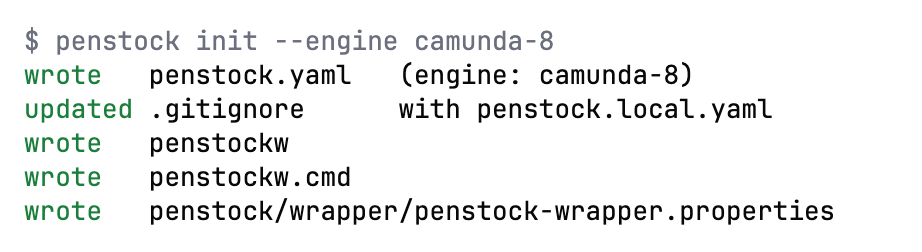
Needs: Free
| Exit code | Meaning |
|---|---|
0 | The file was written. |
1 | The folder could not be written, or the file is already there. |
2 | The CLI itself failed, not the command; the message says what. |
doctor
Check the setup: which configuration layers are in force, which profiles, rules, element templates and engine.
penstock doctor [folder] [--format json]$ penstock doctor
node v26.10.0
root /private/tmp/pex
config penstock.yaml
engine camunda-8
profiles (none)
deployment http://localhost:8080/v2 - answered 404| Option | What it does |
|---|---|
--format <text|json> | json prints the configuration as it resolved, for a tool to read. |
--profile <name> | Use this profile, as PENSTOCK_PROFILE would. |
It prints the Node version, the project root, the configuration files that apply, any problem in them, the engine, the profiles (a star marks the one in force), the rules file and the element template paths (marked missing when they are not there), and whether the deployment address answers, with a 4 second timeout. It also says when the deployment credentials are incomplete. --format json prints the settings as they resolve after every layer.
Example
$ penstock doctor --format json
Needs: Free
| Exit code | Meaning |
|---|---|
0 | The setup was read. |
1 | Something in it could not be read, and the answer says what. |
2 | The CLI itself failed, not the command; the message says what. |
check
Everything wrong with the diagrams, in sections: the drawing itself, the bpmnlint rules and, on Pro, how the processes, decisions and forms actually run.
penstock check [paths...] [--only drawing,rules,flow] [--format text|json|sarif|github] [--baseline] [--update-baseline] [--require-receipt [--base <git-ref>]] [--ci [<pipeline>]]$ penstock check .
ok src/main/resources/approve-order.form
fail src/main/resources/order-process.bpmn
OVERLAP: approve_order <-> charge_card
note bpmnlint/no-overlapping-elements: Element overlaps with other element (approve_order)
ok src/main/resources/shipping-method.dmnChecks .bpmn, .dmn and .form files in three sections: drawing, rules (bpmnlint, and the engine compatibility rules) and flow (how the processes, decisions and forms run). Only errors fail the command. The form check is lint and is free. Flow analysis of processes and decisions is paid. --update-baseline writes the findings to penstock-baseline.json: commit it, and refresh it after an upgrade. --trust-project lets this project's hooks run for this one run, without recording anything. Hooks: preCheck and postCheck. See Diagram check, Validation and Flow analysis.
| Option | What it does |
|---|---|
--only <sections> | which parts to run: drawing, rules, flow. |
--format <format> | text, json, sarif or github; sarif and github are for a code review. |
--baseline | Fail only on findings the baseline does not already accept. |
--update-baseline | Write the current findings as the baseline. |
--require-receipt | Fail when a change an agent made has no valid receipt in .penstock/receipts. ai.verify.requireReceipt: true does it on every check. |
--base <git-ref> | The git ref the changes are counted from for --require-receipt; origin/main by default. |
--ci [<pipeline>] | Check the policy pack as a pipeline does: the pin, any weakened rule or palette and the required checks. The pipeline name is only a label and may be left out; a CI environment variable does the same. |
--trust-project | Let this project's penstock.yaml run its hooks for this run, without writing anything down. |
--profile <name> | Use this profile, as PENSTOCK_PROFILE would. |
Case models (.cmmn) get the case checks: penstock check takes .cmmn files and folders that hold them. The sections include connections, the secrets and MCP clients a diagram names, so --only connections runs only those. The AI agent rules run on every .bpmn file. See Connections map, AI agents of Camunda 8, CMMN case models and Policy pack. With a policy pack, a pipeline run (CI set, or --ci) also fails when the pin is missing or does not match, when the project weakens a forced rule or widens the palette, or when a required check has not run on these files. --require-receipt is described on AI receipt and auto-repair.
Example
$ penstock check --only rules src/orders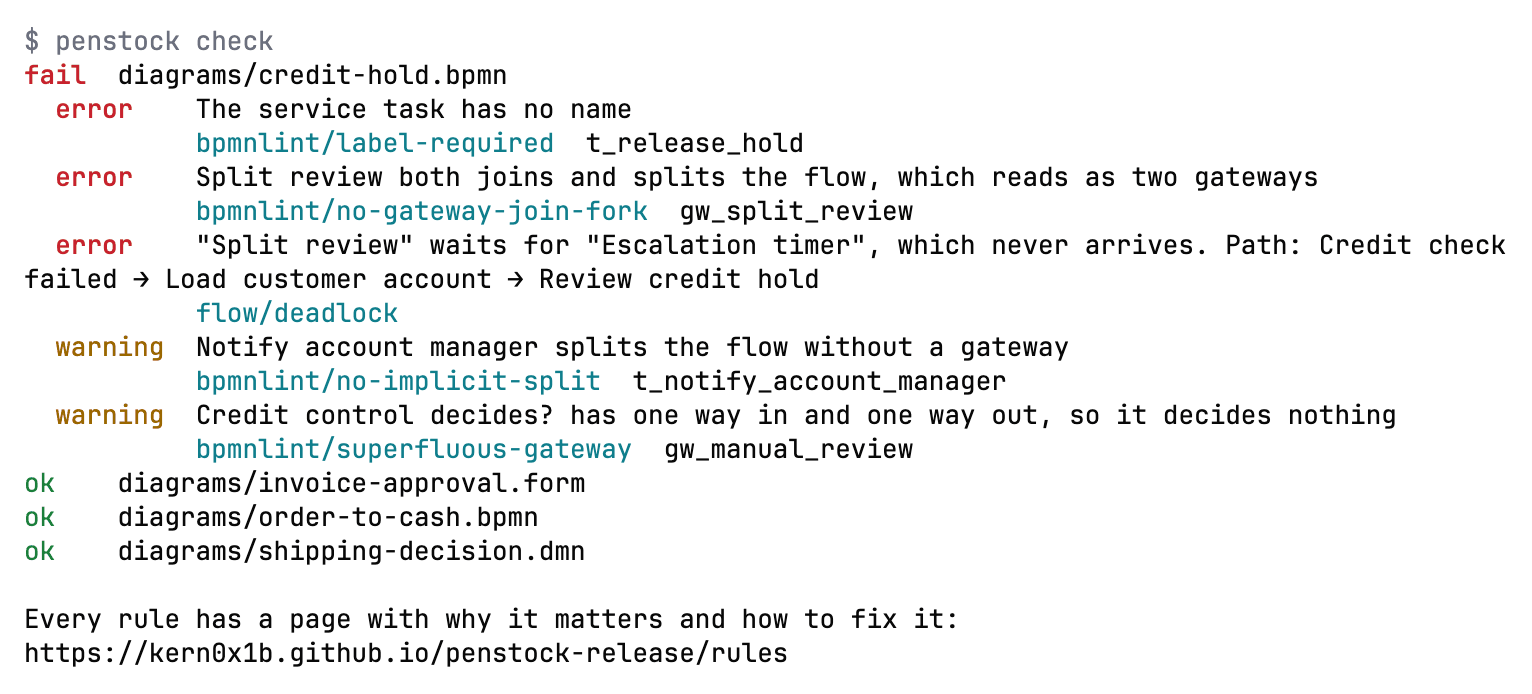
Needs: Free With --only flow, --baseline, --format sarif|github or --require-receipt: Pro, Team in a pipeline. Enforcing the policy pack in a pipeline: Team in a pipeline.
| Exit code | Meaning |
|---|---|
0 | Nothing was found, or everything found is in the baseline. |
1 | Something was found that a person can act on. |
2 | The CLI itself failed, not the command; the message says what. |
migrate analyze
Read the Camunda 7 diagrams and say what does not carry over to Camunda 8, and why.
penstock migrate analyze [paths...] [--format text|json|sarif|github] [--baseline] [--update-baseline]penstock migrate [analyze|convert|apply|plan|verify|agents|report] [paths]. Without a word it runs analyze. The full description is on Camunda 7 to 8. analyze, convert and report take the options below; --target takes a version from 8.5 to 8.9, and the help names 8.8 as the default.
| Option | What it does |
|---|---|
--format <format> | text, json, sarif or github. |
--out <dir> | Where the report, or the converted files, are written. |
--dry-run | Say what would be written and write nothing. |
--target <version> | The Camunda 8 version to convert for, 8.8 by default. |
--fail-on <error|warning> | What makes the exit code 1: error, or warning. |
--baseline | Fail only on findings the baseline does not already accept. |
--update-baseline | Write the current findings as the baseline. |
--verbose | List and annotate what only carries over as it is. |
--profile <name> | Use this profile, as PENSTOCK_PROFILE would. |
Example
$ penstock migrate analyze src/ordersNeeds: Free With --baseline or --format sarif|github: Pro, Team in a pipeline
| Exit code | Meaning |
|---|---|
0 | Nothing would be lost, or everything lost is in the baseline. |
1 | Something would be lost. |
2 | The CLI itself failed, not the command; the message says what. |
migrate convert
Write the Camunda 8 files into a camunda-8 folder next to the one given, with a penstock.yaml of their own. Nothing else in the project is touched.
penstock migrate convert [paths...] [--target 8.5..8.9] [--out <dir>] [--dry-run]Writes the Camunda 8 files into a camunda-8 folder next to the one given, with a penstock.yaml of their own that says engine: camunda-8. Nothing else in the project is touched, so the Camunda 7 files stay as they are. --out chooses another folder. --dry-run says what would be written and writes nothing.
| Option | What it does |
|---|---|
--format <format> | text, json, sarif or github. |
--out <dir> | Where the report, or the converted files, are written. |
--dry-run | Say what would be written and write nothing. |
--target <version> | The Camunda 8 version to convert for, 8.8 by default. |
--fail-on <error|warning> | What makes the exit code 1: error, or warning. |
--baseline | Fail only on findings the baseline does not already accept. |
--update-baseline | Write the current findings as the baseline. |
--verbose | List and annotate what only carries over as it is. |
--profile <name> | Use this profile, as PENSTOCK_PROFILE would. |
Example
$ penstock migrate convert --target 8.8 --dry-run src/ordersNeeds: Pro, Team in a pipeline Analysis and the report are free.
| Exit code | Meaning |
|---|---|
0 | The files were written, or --dry-run found nothing to write. |
1 | Something could not be converted, and the answer says which. |
2 | The CLI itself failed, not the command; the message says what. |
migrate report
Write the migration report to hand on: what each diagram became, and what did not come across.
penstock migrate report [paths...] [--out <dir>]Writes the migration report, Markdown and one self-contained HTML page: what each diagram became and what did not come across.
| Option | What it does |
|---|---|
--format <format> | text, json, sarif or github. |
--out <dir> | Where the report, or the converted files, are written. |
--dry-run | Say what would be written and write nothing. |
--target <version> | The Camunda 8 version to convert for, 8.8 by default. |
--fail-on <error|warning> | What makes the exit code 1: error, or warning. |
--baseline | Fail only on findings the baseline does not already accept. |
--update-baseline | Write the current findings as the baseline. |
--verbose | List and annotate what only carries over as it is. |
--profile <name> | Use this profile, as PENSTOCK_PROFILE would. |
Example
$ penstock migrate report --out docsNeeds: Free
| Exit code | Meaning |
|---|---|
0 | The report was written. |
1 | It could not be written, and the answer says where it tried. |
2 | The CLI itself failed, not the command; the message says what. |
migrate plan
List every change the conversion would make, with a stable id. Writes nothing.
penstock migrate plan [paths...] [--only <ids>] [--exclude <ids>] [--saved] [--save-selection] [--format text|json]Lists every change the conversion would make, per file and per element, with a stable id, the class it falls in (converted automatically, converted with a changed meaning, needs a person, left as is), the reason and an effort estimate. It writes nothing, except the selection when you ask for --save-selection. The ids are what migrate apply --only and --exclude take. The Migration workspace in every host shows the same plan with a checkbox per change: see Camunda 7 to 8.
| Option | What it does |
|---|---|
--format <format> | text, json, sarif or github. |
--only <ids> | Accept only these change ids, comma separated. |
--exclude <ids> | Leave these change ids out, comma separated. |
--saved | Use the selection saved in .penstock/migration-selection.json. |
--save-selection | Save the selection to .penstock/migration-selection.json. |
--target <version> | The Camunda 8 version to convert for, 8.8 by default. |
--profile <name> | Use this profile, as PENSTOCK_PROFILE would. |
Example
$ penstock migrate plan --format json src/ordersNeeds: Free
| Exit code | Meaning |
|---|---|
0 | The plan was listed. |
1 | The selection names an id that is not in the plan, or a file could not be read. |
2 | The CLI itself failed, not the command; the message says what. |
migrate apply
Rewrite the Camunda 7 files in place for Camunda 8, all of them or only the changes you accept.
penstock migrate apply [paths...] [--write] [--only <ids>] [--exclude <ids>] [--saved] [--workers spring|java|node|python] [--target 8.5..8.9] [--format text|json]Rewrites the Camunda 7 BPMN, DMN and forms in place for Camunda 8, translates the expressions it can and lists the ones it cannot, writes a job worker skeleton for each job type and MIGRATION.md, then checks the result as Camunda 8. Without --write it prints a unified diff and writes nothing; it never deletes a file and never follows a symbolic link out of the project. With --only, --exclude or --saved it writes only the accepted changes, atomically, and a rejected element stays byte for byte as it was. An id the plan does not have, an empty list or an over-long id is refused before anything is written, and so is a file that changed or a symbolic link.
| Option | What it does |
|---|---|
--write | Write the changes; without it only the diff is printed. |
--only <ids> | Accept only these change ids, comma separated, from migrate plan. |
--exclude <ids> | Leave these change ids out, comma separated. |
--saved | Use the selection saved in .penstock/migration-selection.json. |
--workers <language> | The job worker skeletons: spring (default), java, node or python. |
--target <version> | The Camunda 8 version to convert for, 8.8 by default. |
--format <format> | text, json, sarif or github. |
--fail-on <error|warning> | What makes the exit code 1: error, or warning. |
--profile <name> | Use this profile, as PENSTOCK_PROFILE would. |
Example
$ penstock migrate apply --write --workers node src/ordersNeeds: Writing is Pro, Team in a pipeline. The diff of the first 3 elements, and migrate analyze, are free.
| Exit code | Meaning |
|---|---|
0 | Nothing is left to convert, or the converted files check with no error. |
1 | The checked result has an error, a file could not be read, or nothing was written because a file changed. |
2 | The CLI itself failed, not the command; the message says what. |
migrate verify
Run the same scenarios on the Camunda 7 diagram and on the converted Camunda 8 diagram, and compare.
penstock migrate verify [paths...] --converted-profile <name> [--original-profile <name>] [--scenarios <glob>] [--run-unreviewed] [--format text|json]Runs the project's saved scenarios on the original Camunda 7 diagram (or Operaton, CIB seven) on one test engine and on the converted Camunda 8 diagram on another, and reports per scenario EQUIVALENT, DIFFERS (the first point of divergence and both traces) or NOT COMPARABLE (with the reason). It compares the element path through the conversion's id map, the final state, incidents and variables by name and value. Both engines must be marked deployment.forTests; nothing runs on a shared or production engine, and a conversion that adds executable content is refused until you confirm it with --run-unreviewed. Secret values never appear in the answer.
| Option | What it does |
|---|---|
--converted-profile <name> | The profile of the Camunda 8 test engine. |
--original-profile <name> | The profile of the Camunda 7 test engine; the default profile without it. |
--scenarios <glob> | Run only the scenario files that match. |
--run-unreviewed | Run even though the conversion adds executable content that you have not reviewed. |
--format <format> | text, json, sarif or github. |
--target <version> | The Camunda 8 version to convert for, 8.8 by default. |
--profile <name> | Use this profile, as PENSTOCK_PROFILE would. |
Example
$ penstock migrate verify --original-profile c7-test --converted-profile c8-test src/ordersNeeds: Pro, Team in a pipeline. The first 3 scenarios are free.
| Exit code | Meaning |
|---|---|
0 | Every scenario is equivalent. |
1 | At least one scenario differs. |
2 | Something cannot be compared, or nothing was run because of a refusal. (The CLI itself failing is also 2.) |
migrate agents
Move the AI agent elements to the 8.10 agent task and agent sub-process templates.
penstock migrate agents [paths...] [--write] [--format text|json]Moves the AI agent elements of the diagrams from the template versions of Camunda 8.9 and earlier to the 8.10 agent task and agent sub-process templates, by the migration rules the new templates declare. It is a dry run by default. An element whose mapping cannot be proven is left untouched and listed with the reason. With --write the files are replaced atomically and a symbolic link is never followed out of the project. See AI agents of Camunda 8.
| Option | What it does |
|---|---|
--write | Replace the files; without it only what would change is printed. |
--format <format> | text, json, sarif or github. |
--profile <name> | Use this profile, as PENSTOCK_PROFILE would. |
Example
$ penstock migrate agents --write src/supportNeeds: Free for the preview of the first 3 elements. --write is Pro, Team in a pipeline.
| Exit code | Meaning |
|---|---|
0 | The migration was previewed or written. |
1 | Nothing was written because a file changed or could not be replaced. |
2 | The CLI itself failed, not the command; the message says what. |
facts
Print the worker contracts that a list of files holds, as JSON.
penstock facts < files.jsonReads {"files": [{"path": "...", "text": "..."}]} on standard input and prints the worker contracts in them as one line of JSON and nothing else. The editors use it to read Python, Go, C# and Scala workers that they cannot read themselves, so you rarely run it by hand. It has no options of its own. Code links are part of Penstock Pro, and Team in a pipeline.
Exit codes: 0 the contracts were printed, 1 the input is not a list of files, 2 the command line itself failed.
code
Check the diagrams against the code: job types, topics, classes and beans with nothing to run them, and workers no diagram uses.
penstock code [paths...] [--format text|json]Reports a job type, topic, class or bean that nothing runs, a called process no diagram defines, and a worker no diagram uses, each with file and line. Reads the repositories in linked. See Code links.
| Option | What it does |
|---|---|
--format <text|json> | How the findings are reported. |
--profile <name> | Use this profile, as PENSTOCK_PROFILE would. |
Example
$ penstock code src/orders
Needs: Pro, Team in a pipeline
| Exit code | Meaning |
|---|---|
0 | Every worker and every reference lines up. |
1 | Something does not, and the answer names it. |
2 | The CLI itself failed, not the command; the message says what. |
templates generate
Write an element template for every job worker the project has, into .camunda/element-templates, so the Camunda palette fills itself in.
penstock templates generate [folder | api-description] [--out <dir>] [--secret-prefix <NAME>] [--write] [--check] [--format text|json]Reads the Java, Kotlin, Groovy and Scala sources under the folder, finds every job worker, and writes an element template for each into .camunda/element-templates. A template that exists is updated, not replaced. It lists each template with its worker, file and line, the number of inputs, and what it did. With no worker in the project it exits with 1. --check writes nothing and does what templates check does. The editors do the same for one worker with Create element template. See Element templates.
Given an OpenAPI 3 (JSON or YAML), Swagger 2.0 or Postman collection file instead of a folder, it makes one REST connector template per operation, with typed inputs from the parameters and request body, authentication from the security schemes as secrets. placeholders, a result expression and error handling. From a file it prints what it would write and writes nothing without --write; it never leaves a half-written file, and refuses a path outside the project or a symbolic link. Generated secret names are PENSTOCK_<API>__<FIELD>, and the list of names to create is in the answer. A name that the project's connector-secrets or .env files already define is warned about, by name only. Text from the spec is never copied as a live reference.
| Option | What it does |
|---|---|
--check | Check instead of write: the same as templates check, and writes nothing. |
--out <dir> | With an API description: where the templates are written, .camunda/element-templates of the project by default. |
--secret-prefix <NAME> | With an API description: the namespace of the secret names the templates read, PENSTOCK_<API> by default; capitals, digits and underscores. |
--write | With an API description: write the templates; without it the answer is what would be written. |
--format <text|json> | How the answer is printed; json is for a pipeline. |
--profile <name> | Use this profile, as PENSTOCK_PROFILE would. |
Example
$ penstock templates generate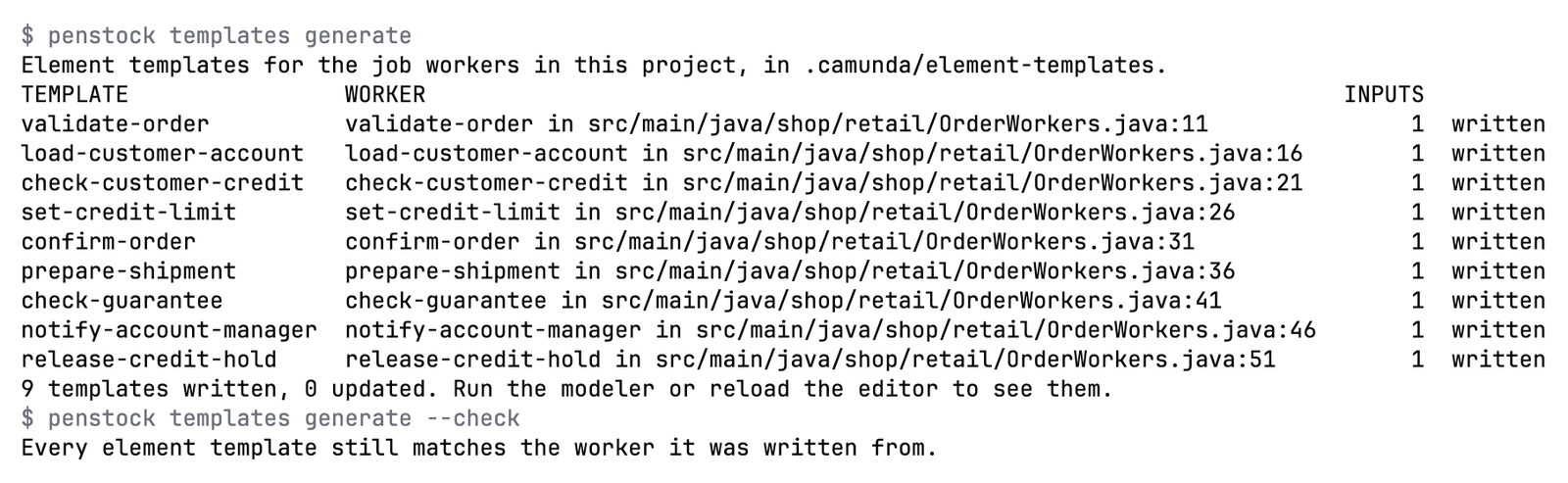
Needs: Pro, Team in a pipeline. Without a licence the first 3 operations of an API description are previewed free.
| Exit code | Meaning |
|---|---|
0 | Every worker has a template, or the API description was read and the templates made. |
1 | A worker could not be written, the description could not be read, or a file was refused. The answer names it. |
2 | The CLI itself failed, not the command; the message says what. |
templates check
Check that every element template still says what its job worker asks for, and that every worker has one. Writes nothing.
penstock templates check [folder] [--format text|json]Lists every element template file in the project and says whether Camunda Desktop Modeler and Web Modeler load it, as a table of files with the two verdicts followed by path:line reasons when one does not (invalid schema, wrong $schema version, engines.camunda mismatch, duplicate id and version, wrong folder, bad appliesTo or binding). Then it checks that every element template still asks for what its worker reads, and that every worker has one. A template that does not load or has drifted is listed with the reason, what it is missing, what it has extra and what has another type, and the exit code is 1, so it works in a pipeline. With no templates in .camunda/element-templates it says so and exits with 0. It writes nothing. The same diagnosis is the “Why not loaded” screen of the template editor: see Element templates.
| Option | What it does |
|---|---|
--format <text|json> | How the answer is printed; json is for a pipeline. |
--check | What templates generate takes to do this instead of writing. |
--profile <name> | Use this profile, as PENSTOCK_PROFILE would. |
Example
$ penstock templates checkNeeds: Free
| Exit code | Meaning |
|---|---|
0 | Every template file loads and still matches its worker. |
1 | A template does not load or has drifted, and the answer says why. |
2 | The CLI itself failed, not the command; the message says what. |
connections
Show the secrets and MCP clients the diagrams name, where the project defines them, and what is missing.
penstock connections [folder] [--env <name>] [--against <name>] [--format text|json]Shows the configuration around the diagrams: every secrets.NAME reference in BPMN and element templates, matched against connector-secrets files, .env, the environment of Docker Compose files, Helm values.yaml (connectors.secrets and env) and Spring Boot application.yaml or .properties; the client id of an MCP client task against the clients in mcp-gateway.yaml or the camunda.client settings; and the Camunda 8.7 property names that 8.8 renamed. Only names are printed, never values. The seven rules of the connections family run in check (--only connections). With --env it looks at one environment (.env.<name>, values-<name>.yaml, application-<name>.yaml and the profiles of penstock.yaml); --env prod --against dev lists what dev defines and prod lacks, before you deploy. See Connections map.
| Option | What it does |
|---|---|
--env <name> | Look at one environment: the shared files and its own (.env.<name>, values-<name>.yaml, application-<name>.yaml, a profile of penstock.yaml). |
--against <name> | With --env: list what the other environment defines and this one lacks, before a deploy. |
--format <text|json> | How the answer is printed; json is for a pipeline. |
--profile <name> | Use this profile, as PENSTOCK_PROFILE would. |
Example
$ penstock connections --env prod --against devNeeds: Free. With --against: Pro, Team in a pipeline.
| Exit code | Meaning |
|---|---|
0 | Nothing the runtime would fail on was found. |
1 | A diagram names something that is missing, an environment is unknown, or --against is not allowed here. |
2 | The CLI itself failed, not the command; the message says what. |
agents
List the AI agents of Camunda 8: model, tools, limits, MCP clients, and what is wrong.
penstock agents [folder] [--format text|json]Lists every AI agent task and agent sub-process with its model and provider, limits, memory, tools with the fromAi() parameters the model fills in, the MCP clients it uses and whether their configuration is found, the tool filters, and what the nine rules of the agents family found. Only names are printed, never values. See AI agents of Camunda 8.
| Option | What it does |
|---|---|
--format <text|json> | How the answer is printed; json is for a pipeline. |
--profile <name> | Use this profile, as PENSTOCK_PROFILE would. |
Example
$ penstock agents --format jsonNeeds: Free
| Exit code | Meaning |
|---|---|
0 | No agent has an error. |
1 | An agent has an error, or the folder does not exist. |
2 | The CLI itself failed, not the command; the message says what. |
agents scenario
Make a scenario for an AI agent, with the model stubbed.
penstock agents scenario <file> [--agent <id>] [--write] [--format text|json]Makes a scenario for the AI agents of a process with the model answer stubbed: the agent job is completed with a canned answer and the scenario asserts that the agent completes and that no tool is run. For an agent sub-process it writes the COMPLETE_JOB_AD_HOC_SUB_PROCESS step that Camunda Process Test runs and the Penstock runner does not. Without --write it only says what would be written.
| Option | What it does |
|---|---|
--agent <id> | Make the scenario for this agent only. |
--write | Save the scenarios next to the diagram's other scenarios; without it the answer is only what would be written. |
--format <text|json> | How the answer is printed; json is for a pipeline. |
--profile <name> | Use this profile, as PENSTOCK_PROFILE would. |
Example
$ penstock agents scenario processes/support.bpmn --writeNeeds: Previewing is Free. With --write: Pro, Team in a pipeline.
| Exit code | Meaning |
|---|---|
0 | The scenarios were made. |
1 | The diagram has no agent, cannot be read, the file could not be written, or --write is not allowed here. |
2 | The CLI itself failed, not the command; the message says what. |
incident scenario
Turn an incident into a scenario that reproduces it.
penstock incident scenario <instanceKey|incidentKey> [folder] [--write] [--run] [--format text|json]Reads an incident of the engine (by its key, or the key of its instance) and prints the scenario that reproduces it, in the Camunda Process Test format: it starts the process with the instance's variables, drives the path the instance took, and ends on an incident of the same type at the same element with the message pattern. Anything that looks like a secret is replaced by a placeholder, the names stay, and a note says so. The answer is the scenario and what it could not take from the engine. --write saves it next to the diagram's other scenarios (atomic, inside the project); --run runs it on the engine of the project, which has to be marked for tests, and says whether the incident reproduced. See Incident to fix.
| Option | What it does |
|---|---|
--write | Save the scenario next to the diagram's other scenarios; without it the answer is only what would be written. |
--run | Run the scenario on the engine of the project and say whether it reproduced the incident; the engine has to be marked for tests. |
--format <text|json> | How the answer is printed; json is for a pipeline. |
--profile <name> | Use this profile, as PENSTOCK_PROFILE would. |
Example
$ penstock incident scenario 2251799813685249 --write --runNeeds: Reading the incident and previewing the scenario is Free. With --write or --run: Pro, Team in a pipeline.
| Exit code | Meaning |
|---|---|
0 | The incident was read and the scenario made, and with --run it reproduced. |
1 | The incident or its diagram could not be found, the file could not be written, the scenario did not reproduce it, or --write or --run is not allowed here. |
2 | The CLI itself failed, not the command; the message says what. |
policy
Keep the rules, conventions, palette, element templates and baselines of a team in a pinned folder in git.
penstock policy [show|init|add-rule <rule> --severity <error|warn|off> [--forced]|pin|verify|sync [--source <address>] [--allow-local-source]] [--project <dir>] [--name <name>] [--format text|json]A policy pack is a folder in git for a team with no server: .penstock/policy/, or the folder policy: path names in penstock.yaml, or a git address and ref fetched only when someone runs penstock policy sync. It holds policy.json with the rules (on, severity, forced), conventions, a reduced palette, element templates, baselines, the checks that must pass (check, scenarios, DMN tests, receipt), and a name and version. The pack is data only: a file that is not json, yaml, md or txt, a symbolic link, a path outside the folder, a plugin, hook or script entry, a reserved key, or more than 200 files, 256 KB a file or 4 MB in all is refused with the reason, and none of the pack applies. The JSON schema is penstock-policy.schema.json. See Policy pack.
show says what is active. init starts a pack. add-rule sets a rule and whether it is forced. pin records a canonical sha256 over every file and the file list in penstock.yaml (policy.pin, comments kept) or penstock.policy.lock. verify recomputes it. sync fetches policy: source into .penstock/policy-source; nothing is fetched otherwise. sync refuses a source that is a network share or a device path (\\host\share, //host/share, \\?\, \\.\); a local folder named by policy: source is accepted only with --allow-local-source, and an address typed with --source may be local. Git runs with a small environment and with the file and ext transports off unless a local source was allowed.
Under CI (the CI variable or penstock check --ci), penstock check fails when the pin is missing or does not match, when the project weakens a forced rule (off, a lower severity) or widens the palette, or when a required check has not run on these files or failed.
| Option | What it does |
|---|---|
--format <text|json> | How the answer is printed; json is for a pipeline. |
--project <dir> | The project the pack belongs to; the current folder by default. |
--name <name> | With init: the name of the policy. |
--severity <level> | With add-rule: error, warn or off. |
--forced | With add-rule: the project may not turn the rule off or lower it. |
--source <address> | With sync: fetch this address instead of policy: source; an address you type here may also be a local folder. |
--allow-local-source | With sync: accept a local folder named by policy: source in penstock.yaml; a network share is never accepted. |
--profile <name> | Use this profile, as PENSTOCK_PROFILE would. |
Example
$ penstock policy add-rule label-required --severity error --forcedNeeds: Showing the policy is Free. The commands that write (init, add-rule, pin, verify, sync) are Pro, Team in a pipeline. Enforcing it in a pipeline is Team in a pipeline (POLICY_PACK).
| Exit code | Meaning |
|---|---|
0 | The pack was shown, written or verified. |
1 | The pack is missing, refused or does not match its pin, or the command is not allowed here. |
2 | The CLI itself failed, not the command; the message says what. |
receipt verify
Verify a change without an agent: new problems, scenarios, a verdict.
penstock receipt verify <file...> [--against <git-ref>] [--write] [--run-scenarios] [--format text|json]Checks a change to diagrams, decisions or forms: the files that changed against a git ref (HEAD unless --against), a diff in the diagram's own terms, the Check result before and after with the new findings named, and the saved scenarios run on the changed processes. The answer is a verdict: verified, has new findings or not verified and why. Only names, hashes and ids are put in it, never file contents or secret values. A receipt is written to .penstock/receipts/<timestamp>-<name>.json only with --write or ai.verify.keepReceipts: true. The saved scenarios run only on an engine marked deployment.forTests, and not when the change adds or changes content that runs (a script, a listener, an expression, a service call) or touches penstock.yaml or the test files; --run-scenarios runs them on request. The receipt format is published as penstock-receipt.schema.json. See AI receipt and auto-repair.
| Option | What it does |
|---|---|
--against <git-ref> | The version to compare with; HEAD by default. |
--write | Keep the receipt as a file in .penstock/receipts; without it nothing is written unless ai.verify.keepReceipts is true. |
--run-scenarios | Run the saved scenarios even when the change adds content that runs or touches the project configuration. |
--format <text|json> | How the answer is printed; json is for a pipeline. |
--profile <name> | Use this profile, as PENSTOCK_PROFILE would. |
Example
$ penstock receipt verify processes/order.bpmn --against origin/mainNeeds: The verdict and the counts are Free. The full receipt and --write are Pro, Team in a pipeline.
| Exit code | Meaning |
|---|---|
0 | The change is verified. |
1 | The change has new findings or could not be verified, a file could not be found, or --write is not allowed here. |
2 | The CLI itself failed, not the command; the message says what. |
receipt check
Check a stored receipt against the files it names.
penstock receipt check <receipt.json> [--format text|json]Checks that the file is a Penstock receipt and that each file it names still hashes to what the receipt recorded. It does not run the check again.
| Option | What it does |
|---|---|
--format <text|json> | How the answer is printed; json is for a pipeline. |
--profile <name> | Use this profile, as PENSTOCK_PROFILE would. |
Example
$ penstock receipt check .penstock/receipts/20261028T100000Z-order.jsonNeeds: Stored receipts are Pro, Team in a pipeline.
| Exit code | Meaning |
|---|---|
0 | The receipt is valid and every file matches it. |
1 | The receipt is not a receipt or cannot be found, or a file changed, is missing or should not exist. |
2 | The CLI itself failed, not the command; the message says what. |
evidence build
Build one reviewable package for an audit.
penstock evidence build [folder] [--out <dir|file.zip>] [--format zip|dir] [--since <git-ref>] [--force]Builds a pack with every diagram as an SVG, the Check results as SARIF and as text, the recorded scenario and DMN test results with rule coverage, the AI receipts (names and hashes only), with --since the diagrams that changed since a git ref drawn in diagram terms with the before and after pictures marked, the connections findings (names only), the migration report if the project has one, an inventory with the SHA-256 of every diagram, and an index.html. With the Team plan it also holds the policy pack identity and pin status and the declared environments. evidence.json lists every file with its SHA-256 beside the tool version, the time and the git commit and author name (never an e-mail address), and evidence.sha256 is the SHA-256 of evidence.json: an integrity checksum that shows the pack was changed afterwards, not a signature and not a legal attestation. It never holds a secret value and never reads a file outside the project. A diagram that is a link, is too large or cannot be drawn, or more than 500 diagrams, stops the pack with the reason. The zip is written beside its place and renamed into it, and an existing pack is never replaced without --force. See Evidence pack.
| Option | What it does |
|---|---|
--out <dir|file.zip> | Where the pack is written; a file name ending in .zip, or the folder of the pack; by default under .penstock of the project. |
--format <zip|dir|json> | zip (the default) or dir for the container; json prints the answer as JSON. |
--since <git-ref> | Add what changed since this ref, drawn in diagram terms. |
--force | Replace a pack that is already there. |
--profile <name> | Use this profile, as PENSTOCK_PROFILE would. |
Example
$ penstock evidence build --since origin/main --out audit.zipNeeds: Pro, Team in a pipeline. The policy and environments sections are part of the Team plan.
| Exit code | Meaning |
|---|---|
0 | The pack was written and verified. |
1 | The pack was refused (a limit, a diagram that cannot be drawn, a file that cannot be inspected, an existing pack) or the licence does not allow it; the message says why. |
2 | The CLI itself failed, not the command; the message says what. |
evidence verify
Check that an evidence pack is unchanged.
penstock evidence verify <pack> [--format text|json]Recomputes the SHA-256 of every file of an evidence pack, a zip or a folder, and names the file that was changed, is missing or was added since it was built. It refuses an entry that climbs out of the pack (.., an absolute path, a backslash), a link or special file, an encrypted or oddly compressed entry, a duplicate and a decompression that would pass its cap, and it reads nothing outside the pack. The seal is an integrity checksum, not a signature: someone who can rewrite the whole pack can also write a new seal, so keep the pack where it cannot be rewritten.
| Option | What it does |
|---|---|
--format <text|json> | How the answer is printed; json is for a pipeline. |
--profile <name> | Use this profile, as PENSTOCK_PROFILE would. |
Example
$ penstock evidence verify audit.zipNeeds: Free
| Exit code | Meaning |
|---|---|
0 | Every file matches the manifest and the seal matches the manifest. |
1 | The pack was changed, is incomplete or cannot be read; the message says what. |
2 | The CLI itself failed, not the command; the message says what. |
refactor rename
Rename a name across the project, with a preview first.
penstock refactor rename <kind> <old> <new> [--apply] [--force] [--acknowledge] [--project <dir>] [--format text|json]Renames a process variable, message, signal, error code, escalation, job type, topic, decision id, form key or process id (the called element of a call activity). The kind is one of variable, message, signal, error, escalation, job-type, topic, decision, form and process. It works across the BPMN, DMN and form files, the element templates, the application yaml and properties, the test cases and the code, and prints every edit with its file, line and before and after, together with every place it refuses to touch and why (a script, a computed name, a filter or binding that hides the variable, an expression that does not parse, a link, a file outside the project, a file too large). It only previews unless --apply is given, and --apply writes only the plan it has just shown: every file is written whole and atomically, only when it still reads as it did, and a failed write puts them all back. It refuses when the git tree has uncommitted changes unless --force, when the new name already exists or is not valid for that kind, and when refused places remain unless --acknowledge. It follows no link and edits nothing outside the project root. See Refactoring across the project.
| Option | What it does |
|---|---|
--apply | Write the changes; without it only the preview is printed. |
--force | Apply although the git tree has uncommitted changes. |
--acknowledge | Apply although the preview lists places it refuses to touch, which stay as they are. |
--project <dir> | The project folder, the current folder by default. |
--format <text|json> | How the answer is printed; json is for a pipeline. |
--profile <name> | Use this profile, as PENSTOCK_PROFILE would. |
Example
$ penstock refactor rename variable orderId order_id --applyNeeds: A single rename, with its preview, is Free, with no time limit.
| Exit code | Meaning |
|---|---|
0 | The preview was printed, or the changes were written. |
1 | The plan is blocked or refused (the message says why), the git tree is not clean, or a file changed since the preview. |
2 | The CLI itself failed, not the command; the message says what. |
refactor bulk
Apply the renames of a mapping file in order.
penstock refactor bulk <mapping-file> [--apply] [--force] [--acknowledge] [--project <dir>] [--format text|json]Applies the renames of a JSON file (a renames list of kind, from and to) or of lines kind,old,new, in order, each on the result of the one before, with one plan and one atomic write. The preview, the refusals and the limits are those of refactor rename.
| Option | What it does |
|---|---|
--apply | Write the changes; without it only the preview is printed. |
--force | Apply although the git tree has uncommitted changes. |
--acknowledge | Apply although the preview lists places it refuses to touch, which stay as they are. |
--project <dir> | The project folder, the current folder by default. |
--format <text|json> | How the answer is printed; json is for a pipeline. |
--profile <name> | Use this profile, as PENSTOCK_PROFILE would. |
Example
$ penstock refactor bulk renames.json --applyNeeds: Pro, Team in a pipeline.
| Exit code | Meaning |
|---|---|
0 | The preview was printed, or the changes were written. |
1 | The plan is blocked or refused (the message says why), the git tree is not clean, a file changed since the preview, or the licence does not allow it. |
2 | The CLI itself failed, not the command; the message says what. |
refactor extract
Move a subprocess or a fragment into its own process and call it.
penstock refactor extract <file.bpmn> <element-ids> <new-process-id> [--name <name>] [--apply] [--force] [--project <dir>] [--format text|json]Moves one embedded subprocess, or a group of elements with exactly one way in and one way out, into a new process file next to the diagram and puts a call activity in its place, wired through variable mappings (Camunda 8 zeebe:ioMapping, Camunda 7 camunda:in and camunda:out), with the diagram drawing moved and the referenced messages, signals, errors and escalations copied. It refuses, with the reason, a selection with several entries or exits, a condition on the way out, a boundary event without its task, compensation, a link event, a data object, a message flow or association across the edge, an expression it cannot read, a variable read by a computed name, a name that is already taken, and any result that would be less valid than the diagram was.
| Option | What it does |
|---|---|
--name <name> | With extract: the name of the new process and of the call activity. |
--apply | Write the changes; without it only the preview is printed. |
--force | Apply although the git tree has uncommitted changes. |
--project <dir> | The project folder, the current folder by default. |
--format <text|json> | How the answer is printed; json is for a pipeline. |
--profile <name> | Use this profile, as PENSTOCK_PROFILE would. |
Example
$ penstock refactor extract order.bpmn Activity_pack,Activity_label packing --applyNeeds: Pro, Team in a pipeline.
| Exit code | Meaning |
|---|---|
0 | The preview was printed, or the changes were written. |
1 | The plan is blocked or refused (the message says why), the git tree is not clean, a file changed since the preview, or the licence does not allow it. |
2 | The CLI itself failed, not the command; the message says what. |
scenarios list
List every distinct way through each process, with the conditions it takes. This is a test plan.
penstock scenarios list [paths...] [--format text|json|md]A test plan, in words: the path and the conditions that decide it. --format md writes a checklist a person can work through. --format json is for tools. See Process tests and coverage.
| Option | What it does |
|---|---|
--format <text|json|md> | How the scenarios are listed; md is a page a person reads. |
--profile <name> | Use this profile, as PENSTOCK_PROFILE would. |
Example
$ penstock scenarios list --format mdNeeds: Pro, Team in a pipeline
| Exit code | Meaning |
|---|---|
0 | The scenarios were listed. |
1 | A process could not be read, and the answer names it. |
2 | The CLI itself failed, not the command; the message says what. |
scenarios run
Run the Camunda test-case files of the diagrams against the engine they name, step by step, with the mocks the file asks for.
penstock scenarios run [paths...] [--timeout <seconds>] [--junit-xml <file>] [--junit] [--teamcity]Runs the Camunda test-case files of the diagrams against the engine they name, step by step, with the mocks the file asks for. Every case is checked against the Camunda Process Test schema (8.9 and 8.10) before the run: fifteen instructions run and are written back unchanged, and the thirteen Penstock cannot run yet are named in a message instead of being dropped. A run deploys a test build of its own, prefixed penstock.<run>., so the definitions you deployed are not touched. In a pipeline the engine needs deployment.forTests: true. Press Ctrl and C once to ask the engine to stop and keep going, and twice to cancel the running case and remove its build. See Scenarios.
| Option | What it does |
|---|---|
--timeout <seconds> | How long one step may take, 30 by default. |
--junit-xml <file> | Where a JUnit XML report is written. |
--junit | Write a Camunda Process Test class that runs them instead. |
--teamcity | Report as TeamCity service messages, as the IDE reads them. |
--profile <name> | Use this profile, as PENSTOCK_PROFILE would. |
Example
$ penstock scenarios run --junit-xml target/scenarios.xml
Needs: Pro, Team in a pipeline
| Exit code | Meaning |
|---|---|
0 | The run finished with no failing case. |
1 | A case failed, or the engine could not be reached. |
2 | The CLI itself failed, not the command; the message says what. |
130 | Ctrl-C twice: the case is cancelled, its build removed, and the run stops. |
scenarios generate
Write the Camunda test-case files from the ways through each process, which scenarios run then plays back against an engine.
penstock scenarios generate [paths...]Writes the Camunda test-case files from the ways through each process: one scenario for every way through, with example variables and a completing mock for each task. A process that starts on a message, a timer or a signal is planned from that start event, and a start kind that cannot be expressed as a scenario is said in the review rather than left out quietly. Cases already in a file are kept. See Scenarios.
scenarios generate is test-cases --generate. Two old names still work and are left out of the help: paths is scenarios list, and tests is junit.
| Option | What it does |
|---|---|
--timeout <seconds> | How long one step may take, 30 by default. |
--junit-xml <file> | Where a JUnit XML report is written. |
--teamcity | Report as TeamCity service messages, as the IDE reads them. |
--profile <name> | Use this profile, as PENSTOCK_PROFILE would. |
Example
$ penstock scenarios generate src/ordersNeeds: Pro, Team in a pipeline
| Exit code | Meaning |
|---|---|
0 | The run finished with no failing case. |
1 | A case failed, or the engine could not be reached. |
2 | The CLI itself failed, not the command; the message says what. |
130 | Ctrl-C twice: the case is cancelled, its build removed, and the run stops. |
test task
Run one element of a diagram on the engine the project names, and print what it did.
penstock test task <file.bpmn> --element <id> [--variables <json>] [--complete <json> | --error <code> | --hold] [--id <process>] [--timeout <seconds>]Deploys the process as a test build, starts an instance with --variables (or --variables-file) over the values the path needs, and completes or mocks every step before the element. Then it completes the element, makes it throw a BPMN error, or leaves it waiting. It prints the state of the element, what it received and sent, the variables, the incidents and the state of the instance. The trace is kept under .penstock/runs and the build is removed afterwards. The engine must be marked for tests, as for scenarios run: in a pipeline that is deployment.forTests: true. See Scenarios.
| Option | What it does |
|---|---|
--element <id> | The element to test. Required. |
--variables <json> | Variables the instance starts with, over the ones the path needs. |
--variables-file <file> | The same variables, read from a JSON file. |
--complete <json> | Complete the element with these variables. This is the default when none of the three is given. |
--error <code> | Make the element throw this BPMN error instead of completing. |
--hold | Leave the element waiting, to see what it received. |
--id <process> | Which process, when the file holds more than one. |
--timeout <seconds> | How long one step may take, 30 by default. |
--profile <name> | Use this profile, as PENSTOCK_PROFILE would. |
Use only one of --complete, --error and --hold. A user task cannot throw an error. An element that no way through the process reaches is refused.
Example
$ penstock test task orders.bpmn --element Approve --variables '{"order": "A-1"}'Needs: Pro, Team in a pipeline
| Exit code | Meaning |
|---|---|
0 | The run finished. |
1 | The run failed, or the engine could not be reached. |
2 | The CLI itself failed, not the command; the message says what. |
test-cases
The command behind scenarios run and scenarios generate: run the Camunda test-case files of the diagrams against the engine they name, step by step, with the mocks the file asks for. --generate writes those files from the ways through each process instead.
penstock test-cases [paths...] [--generate] [--junit] [--junit-xml <file>] [--timeout <seconds>] [--teamcity]penstock test-cases is scenarios run, and penstock test-cases --generate is scenarios generate. Both names run the same code, so a script that already says test-cases keeps working. A value of --timeout that is not a number of seconds is refused before any case runs: The timeout should be a number of seconds.
| Option | What it does |
|---|---|
--generate | Write the test-case files from the ways through each process, instead of running them. |
--junit | Write a Camunda Process Test class that runs them instead. |
--junit-xml <file> | Where a JUnit XML report is written. |
--timeout <seconds> | How long one step may take, 30 by default. |
--teamcity | Report as TeamCity service messages, as the IDE reads them. |
--profile <name> | Use this profile, as PENSTOCK_PROFILE would. |
Example
$ penstock test-cases --junit-xml target/scenarios.xmlNeeds: Pro, Team in a pipeline
| Exit code | Meaning |
|---|---|
0 | The run finished with no failing case. |
1 | A case failed, or the engine could not be reached. |
2 | The CLI itself failed, not the command; the message says what. |
130 | Ctrl-C twice: the case is cancelled, its build removed, and the run stops. |
test dmn
Run the saved test cases of the decision tables in DMN files and report which rules they cover.
penstock test dmn [<file.dmn|folder>...] [--format text|json|junit] [--min-rule-coverage <percent>]Runs the saved test cases of the decision tables: each case gives the decision its inputs, compares the outputs with the expected ones and names the rules that matched. Cases live next to the file as <name>.dmn.tests.json, with the JSON schema penstock-dmn-tests.schema.json. The rule coverage lists the rules no case reaches, counted for the hit policy of the table. See DMN tests.
| Option | What it does |
|---|---|
--format <text|json|junit> | How the answer is printed: text, json, or junit for a pipeline. |
--min-rule-coverage <percent> | Fail when the rule coverage of the decision tables is below this percentage, from 0 to 100. |
--profile <name> | Use this profile, as PENSTOCK_PROFILE would. |
Example
$ penstock test dmn decisions --min-rule-coverage 80 --format junitNeeds: A local run of up to 3 cases per decision is Free. More cases, junit output, --min-rule-coverage and any run in a pipeline are Pro, Team in a pipeline.
| Exit code | Meaning |
|---|---|
0 | Every case passed and the coverage, when one was asked for, is met. |
1 | A case failed or could not be evaluated, a file could not be read, the coverage is below the minimum, or the run is not allowed here. |
2 | The CLI itself failed, not the command; the message says what. |
junit
Write a JUnit test for every way through each process, with the variables that take it there, for Camunda Process Test or camunda-bpm-assert.
penstock junit [paths...] [--out <dir>] [--package <name>]Writes a JUnit test for every way through each process, with the variables that take it there, for Camunda Process Test or camunda-bpm-assert. The command names the test dependencies your build lacks, using each engine's own Java packages: org.camunda for Camunda 7, org.operaton for Operaton, org.cibseven for CIB seven. See Process tests and coverage.
| Option | What it does |
|---|---|
--out <dir> | Where the tests are written. |
--package <name> | The package the tests are written in. |
--profile <name> | Use this profile, as PENSTOCK_PROFILE would. |
Example
$ penstock junit --out src/test/java --package com.acme.ordersNeeds: Pro, Team in a pipeline
| Exit code | Meaning |
|---|---|
0 | The tests were written. |
1 | A test could not be written, and the answer names the process. |
2 | The CLI itself failed, not the command; the message says what. |
layout
Lay the diagrams out as a readable left-to-right flow, whatever they were drawn like.
penstock layout [paths...] [--write]$ penstock layout .
STATUS FILE DETAILS
change order-process.bpmn would reflow layout (pass --write to save)
Auto layout always reflows, so a difference here is expected; pass --write to take it.Lays the diagrams out as a readable left-to-right flow, whatever they were drawn like, including long chains of elements. Without --write the answer is the plan, and nothing is changed or written beside the diagram. With it the file is written whole, never half-written. Hooks: preLayout, postLayout. See Auto layout.
| Option | What it does |
|---|---|
--write | Save what was laid out; without it the answer is the plan and the file is untouched. |
--trust-project | Let this project's penstock.yaml run its hooks for this run, without writing anything down. |
--profile <name> | Use this profile, as PENSTOCK_PROFILE would. |
Example
$ penstock layout --write src/ordersNeeds: Pro, Team in a pipeline
| Exit code | Meaning |
|---|---|
0 | The diagrams do not overlap and nothing runs through a shape. |
1 | A diagram could not be laid out, and the answer says which. |
2 | The CLI itself failed, not the command; the message says what. |
fmt
Rewrite the XML the way the editor saves it, so a diff of a diagram stays readable.
penstock fmt [paths...] [--write]$ penstock fmt src/orders
STATUS FILE DETAILS
same order-process.bpmn already formattedRewrites the XML the way the editor saves it, so a renamed task is a one-line diff. Without --write it lists each file as same or change and leaves the files alone, and it exits with 1 if any file would change, so it also works as a check in a pipeline. With --write a file is written whole, never half-written. It formats a decision file (.dmn) you name as well as a diagram. A form is JSON, not XML, so it is listed as skip and left as it is.
| Option | What it does |
|---|---|
--write | Save the result; without it the answer is the diff and the file is untouched. |
--profile <name> | Use this profile, as PENSTOCK_PROFILE would. |
Example
$ penstock fmt --write src/ordersNeeds: Free
| Exit code | Meaning |
|---|---|
0 | Every file is already formatted, or was. |
1 | A file could not be parsed, and the answer names it. |
2 | The CLI itself failed, not the command; the message says what. |
diff
What changed between two versions of a process: two files, or what the working tree changed since a commit, a branch or a tag.
penstock diff <before> <after> | penstock diff [<ref>] [paths...] [--images]penstock diff before.bpmn after.bpmn # two files
penstock diff main # working tree against a branch, tag or commit
penstock diff HEAD~3 src/orders # limit to some paths
penstock diff main --images # pictures with changes coloured$ penstock diff HEAD
src/main/resources/order-process.bpmn
changed ServiceTask "Charge the card" charge_card (name)Lists added, removed and changed elements by name, and says only the drawing moved when that is all. It compares BPMN diagrams, DMN decision files (by rule and cell id) and Camunda forms (by component id), and refuses two files of different kinds. With a reference it lists the changed .dmn and .form files too; --images draws BPMN only. Without a reference it compares against HEAD~1. --out chooses where the pictures go, .penstock/images by default. It needs a Git repository for a reference.
| Option | What it does |
|---|---|
--images | Render before and after, with the changes coloured. |
--out <dir> | Where the pictures are written. |
--profile <name> | Use this profile, as PENSTOCK_PROFILE would. |
Example
$ penstock diff HEAD~1 --imagesNeeds: Free With --images: Pro, Team in a pipeline
| Exit code | Meaning |
|---|---|
0 | Nothing changed. |
1 | Something did, and the answer lists it. |
2 | The CLI itself failed, not the command; the message says what. |
export
Render the diagrams as pictures, one file per diagram.
penstock export [paths...] [--format svg|png] [--out <dir>]Renders the diagrams as pictures, one file per diagram. SVG is drawn by Penstock from the coordinates and needs no browser. --format png needs puppeteer installed in the project. See Export.
| Option | What it does |
|---|---|
--format <svg|png> | svg or png; the format the export is asked for. |
--out <dir> | Where the pictures are written. |
--profile <name> | Use this profile, as PENSTOCK_PROFILE would. |
Example
$ penstock export --format png --out docs/diagramsNeeds: Free
| Exit code | Meaning |
|---|---|
0 | Every diagram was written. |
1 | A diagram could not be rendered, and the answer names it. |
2 | The CLI itself failed, not the command; the message says what. |
share
One HTML file to send: a read-only viewer with zoom, pan and the documentation of each element. It opens offline, with nothing else on the page.
penstock share <file> [--out <file.html>]Takes one .bpmn, .dmn or .form file and writes one HTML file: a read-only viewer with zoom, pan and the documentation of each element. It opens offline in any browser and loads nothing else. -o is the same as --out. See Share as HTML.
| Option | What it does |
|---|---|
--out <file.html> | The file to write; -o is the same. |
--profile <name> | Use this profile, as PENSTOCK_PROFILE would. |
Example
$ penstock share src/orders/order.bpmn -o order.htmlNeeds: Free
| Exit code | Meaning |
|---|---|
0 | The file was written. |
1 | It could not be written, and the answer says where it tried. |
2 | The CLI itself failed, not the command; the message says what. |
import
Turn a draw.io, Visio, Signavio, Bizagi or Flowable diagram into BPMN 2.0, and list what could not be mapped. A Camunda Modeler project folder is read with --from modeler.
penstock import <file|folder> [--from modeler|signavio|bizagi|flowable] [--to camunda7|camunda8] [--report] [--modeler-data <folder>] [--out <file.bpmn>] [--force] [--format text|json]Turns a draw.io, Visio, Signavio, Bizagi or Flowable diagram into BPMN 2.0 and prints what was not imported, what was guessed and what was not carried over. -o is the same as --out. --from names the tool the file came from and the import refuses a file that came from another one; --report writes nothing and only lists what was converted, kept and not mapped. A Flowable file is converted to Camunda 7, or to Camunda 8 with --to camunda8: assignee, candidate users and groups, due date, form key, class, delegate expression, async, execution and task listeners, fields and form properties; what has no equivalent stays in the file and is listed. Signavio and Bizagi extensions stay in the file in their own namespaces, and the report says that no engine uses them.
--from modeler reads a Camunda Modeler project folder and says what Penstock does with each part: the element template folders (.camunda/element-templates, resources/element-templates and the user-level folder, which one Penstock reads as it is and which one to list under elementTemplates), the .bpmnlintrc rules (which Penstock Check knows and which not), the flags and settings files, the plugins (listed only, never run), how many .bpmn files carry camunda: or zeebe: extensions (they are never changed) and which Camunda Modeler shortcuts have a Penstock action. With -o it writes those as a VS Code keymap to merge into keybindings.json by hand; Penstock does not bind Ctrl+=, Ctrl+- or Ctrl+0 in VS Code for you, since those are the window zoom keys there.
An imported file is untrusted: a file over 64 MB, or an XML that declares entities or is nested too deep, is refused, and the project scan never follows a link, never leaves the folder and never reads or runs a plugin.
| Option | What it does |
|---|---|
--from <modeler|signavio|bizagi|flowable> | The tool the file came from; the import refuses a file that is from another one, and modeler reads a project folder. |
--to <camunda7|camunda8> | For Flowable: the Camunda version its extensions are converted to, camunda7 without it. |
--report | Write nothing and say only what was converted, kept and could not be mapped. |
--modeler-data <folder> | With --from modeler: the Camunda Modeler user data folder, instead of the usual one. |
--out <file.bpmn> | The file to write; -o is the same. With --from modeler on a folder, the VS Code keymap file. |
--force | Replace a file that is already there. |
--format <text|json> | json reports what could not be mapped as a document a tool can read. |
--profile <name> | Use this profile, as PENSTOCK_PROFILE would. |
Example
$ penstock import legacy.drawio -o order.bpmn
$ penstock import flowable-order.bpmn --from flowable --to camunda8 --report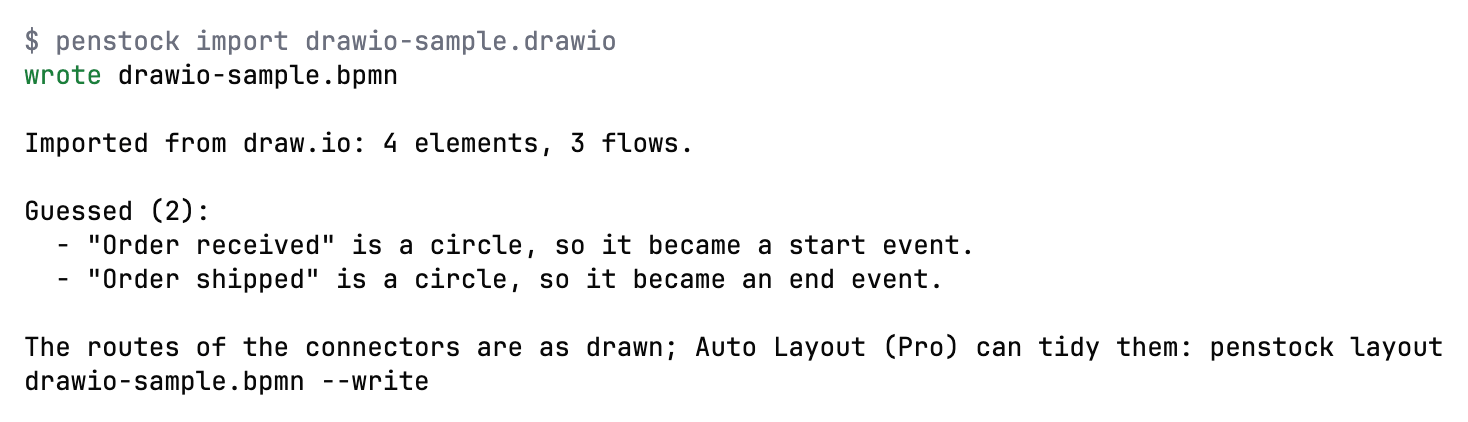
Needs: Free
| Exit code | Meaning |
|---|---|
0 | The diagram was written. |
1 | Something could not be mapped, and the answer says what. |
2 | The CLI itself failed, not the command; the message says what. |
docs
Write documentation for every process, decision file and form: a page each, with the picture, the steps, the decisions, the events and the data.
penstock docs [paths...] [--format html|md|docx|pdf] [--out <dir>]$ penstock docs . --out docs-out
wrote docs-out/approve-order.html
wrote docs-out/order-process.html
wrote docs-out/shipping-method.html
wrote docs-out/index.html
3 diagram(s) documented.A page for each process: its picture, steps with what runs them and who, decisions and conditions, events, the data each step sets and reads, and whether it runs to its end. A page for each .dmn file with every decision's rules as a table, its hit policy in words and the table check. A page for each form with the variable every field writes. HTML by default, --format md for a wiki, --format docx for a Word file and --format pdf for a PDF. Word and PDF hold the same content as the HTML page, one file for each diagram, with the picture drawn as a vector, so it stays sharp at any zoom. They have no index page. A PDF uses a font the machine already has when a name or a note holds characters outside Western European languages (Cyrillic, Greek, Chinese, Japanese, Korean), and says which characters it could not show when none has them; the Word file leaves the font to Word.
| Option | What it does |
|---|---|
--format <html|md|docx|pdf> | html, md, docx or pdf. |
--out <dir> | Where the pages are written. |
--profile <name> | Use this profile, as PENSTOCK_PROFILE would. |
Example
$ penstock docs --format docx --out docs/processes
wrote docs/processes/order-process.docx

1 page written (1 process)
Needs: Pro, Team in a pipeline
| Exit code | Meaning |
|---|---|
0 | The pages were written. |
1 | A page could not be written, and the answer names it. |
2 | The CLI itself failed, not the command; the message says what. |
report
One markdown comment for a pull request: the check, the diff and a picture of every diagram that changed.
penstock report [folder] [--base <ref>] [--out <file.md>] [--images-dir <dir>]Writes one Markdown comment for a pull request: the check, what changed and a picture of every diagram that changed, with the changes outlined. The defaults are origin/main for --base, penstock-report.md for --out and .penstock/images for --images-dir. --image-base is where the pictures will be served from, so the comment shows them, and --images-link is where to find them instead when they cannot be shown inline. It needs a Git repository. See Pipelines, reports and the bot.
| Option | What it does |
|---|---|
--base <ref> | What the report compares against, origin/main by default. |
--out <file> | Where the markdown is written. |
--images-dir <dir> | Where the pictures are written. |
--image-base <url> | Where the pictures will be served from, for a comment that shows them. |
--images-link <url> | Where to find them instead, when they cannot be shown inline. |
--profile <name> | Use this profile, as PENSTOCK_PROFILE would. |
Example
$ penstock report --base origin/main --out penstock-report.mdNeeds: Pro, Team in a pipeline
| Exit code | Meaning |
|---|---|
0 | The report was written. |
1 | It could not be written, and the answer says where it tried. |
2 | The CLI itself failed, not the command; the message says what. |
bot
Answer in a pull or merge request, from the CI run it is in. penstock init --ci sets the pipeline up.
penstock bot [folder] [--stage draw|post]Answers in a pull or merge request, from the CI run it is in. --stage draw draws the pictures now and --stage post posts later, when the pictures are uploaded between. penstock init --ci writes the pipeline. See Pipelines, reports and the bot.
| Option | What it does |
|---|---|
--stage <draw|post> | Draw the pictures now and post later, when they are uploaded between. |
--profile <name> | Use this profile, as PENSTOCK_PROFILE would. |
Example
$ penstock bot --stage drawNeeds: Pro, Team in a pipeline
| Exit code | Meaning |
|---|---|
0 | The answer was posted, or the pictures were drawn. |
1 | It could not be, and the answer says why. |
2 | The CLI itself failed, not the command; the message says what. |
deploy
Deploy the processes, decisions and forms to the engine the configuration names.
penstock deploy [paths...] [--dry-run] [--wait] [--only-changed] [--confirm <env>] [--approve-file <file>]$ penstock deploy . --dry-run
STATUS ENDPOINT FILES TARGET DETAILS
would send http://localhost:8080/v2/deployments 3 files order-example src/main/resources/approve-order.form, src/main/resources/order-process.bpmn, src/main/resources/shipping-method.dmnDeploys the processes, decisions and forms to the engine the configuration names. Files are grouped by the target each folder asks for, and a file with no deployment.url is skipped. A Flowable or Activiti project is not deployed to: deploy says Deploying to Flowable is not supported; deploy with the engine's own tools and writes no request. --wait asks the engine until it shows the definitions: “deployed” and “running” are not the same claim, and it prints live order-process v3. Secrets come from PENSTOCK_PASSWORD, PENSTOCK_CLIENT_SECRET and PENSTOCK_TOKEN. Any PENSTOCK_* variable that matches a setting overrides it for the run. Hooks: preDeploy, postDeploy. See Deployment.
With --only-changed a resource whose normalised content equals the latest version on the engine is left out and reported as “unchanged, skipped”, so deploying the same diagram again makes no new version. When the engine cannot be read everything is sent and the answer says so. A profile with deployment.protected: true needs --confirm <name>, the name of the environment typed again, and in a pipeline also --approve-file, an approval record (JSON with the environment, the hash of every file, approvedBy, approvedAt and validUntil). The record is a document kept in git, not a signature or a cryptographic proof, and it is checked in Team. See Drift, promote and protected environments.
The answer is one table with the columns STATUS, ENDPOINT, FILES, TARGET and DETAILS. There is a row for each engine the files go to, and a row for each file that is skipped. The status is would send for a dry run, sent when the engine took the files, fail when it did not, skip for a file with no deployment.url, and note for a warning. What the engine said, and the lines --wait adds, such as live order-process v3, follow in DETAILS. In a terminal the table is aligned and has its header. When the output is piped it is tab-separated and has no header, for a script to cut. When no file has a deployment.url, deploy says Nothing to deploy: no file has a deployment.url. and exits with 1.
Before anything is sent, deploy says so when deployment.auth.type is basic and there is no PENSTOCK_PASSWORD, rather than letting the engine refuse it. An answer of 401 or 403 says which of deployment.auth in penstock.local.yaml, PENSTOCK_PASSWORD, PENSTOCK_CLIENT_SECRET or PENSTOCK_TOKEN to set. A password: key in penstock.local.yaml is not read.
| Option | What it does |
|---|---|
--dry-run | Say what would be sent, and send nothing. |
--wait | Confirm with the engine that the definitions are live. |
--only-changed | Leave out what the engine already has, unchanged, and say so for each resource. |
--confirm <env> | The name of a deployment marked protected, typed again. |
--approve-file <file> | In a pipeline, the approval record a protected deployment needs. |
--trust-project | Let this project's penstock.yaml run its hooks for this run, without writing anything down. |
--profile <name> | Use this profile, as PENSTOCK_PROFILE would. |
Example
$ penstock deploy --dry-run src/ordersNeeds: Free. The approval record of a protected environment is checked in Team in a pipeline.
| Exit code | Meaning |
|---|---|
0 | The engine took the deployment. |
1 | It did not, and the answer says what it said. |
2 | The CLI itself failed, not the command; the message says what. |
drift
Compare the processes and decisions in the project with what an environment has deployed.
penstock drift [folder] [--env <name>] [--against <name>] [--format text|json]Reads the latest definitions of an environment (a profile of penstock.yaml that sets its own deployment.url, or the plain section) on Camunda 7 and 8, compares them with the local files after the same normalisation (whitespace, attribute order, comments and the order of incoming and outgoing references do not count) and says per resource: in sync, local ahead, engine ahead (someone changed the engine and your file has not changed since the last deploy), differs (changed on both sides, or there is no deploy record to tell which), only local or only on the engine. Forms are not read from an engine and are not compared. Names and hashes only, never a credential. .penstock/deployments.json records what was deployed to each environment (a hash and a version) and is the baseline for “local ahead” and “engine ahead”. The Drift screen of every host shows the same as a grid. See Drift, promote and protected environments.
| Option | What it does |
|---|---|
--env <name> | The environment to read; the one deploy would use by default. |
--against <name> | Also read this environment and compare the two with each other. |
--format <text|json> | How the answer is printed; json is for a pipeline. |
--profile <name> | Use this profile, as PENSTOCK_PROFILE would. |
Example
$ penstock drift --env prod --against stagingNeeds: Free for one environment. With --against: Pro, Team in a pipeline.
| Exit code | Meaning |
|---|---|
0 | Everything is in sync. |
1 | Something is not in sync, or two environments differ. |
2 | An environment could not be read: unknown, not set up, unreachable or credentials refused. (The CLI itself failing is also 2.) |
promote
Take what is deployed and verified on one environment to another, as a dry run unless --write.
penstock promote --from <env> --to <env> [--dry-run] [--write] [--confirm <env>] [--approve-file <file>] [--format text|json]Takes exactly what the --from environment runs (the resources whose content there equals the local file) to the --to environment. The plan lists what would be created or updated, the secrets and MCP clients the target lacks (names only, never values), whether the files fit the target's engine version and element templates, and the policy pack status. It is a dry run unless --write is given, and --write deploys only to an environment declared in penstock.yaml, to its own address, never to one from an environment variable. A target marked deployment.protected: true needs --confirm <its name>, and in a pipeline also --approve-file, the approval record described under deploy. The record is a document kept in git and not a signature, so protect the folder that holds it. See Drift, promote and protected environments.
| Option | What it does |
|---|---|
--from <env> | The environment whose deployed content is promoted. |
--to <env> | The environment to deploy to. |
--dry-run | Plan only; this is the default. |
--write | Deploy after the plan is clean. |
--confirm <env> | The name of a protected target, typed again. |
--approve-file <file> | In a pipeline, the approval record for a protected target. |
--format <text|json> | How the answer is printed; json is for a pipeline. |
--profile <name> | Use this profile, as PENSTOCK_PROFILE would. |
Example
$ penstock promote --from dev --to prod --write --confirm prodNeeds: Pro, Team in a pipeline, a dry run included. Policy enforcement and approvals in a pipeline are Team.
| Exit code | Meaning |
|---|---|
0 | The plan is clean, or the deployment was taken. |
1 | Something blocks the promotion, and the answer says what. |
2 | An environment is unknown, not set up or could not be read. (The CLI itself failing is also 2.) |
show
List a diagram's elements, flows and properties, for a person or for a tool to read.
penstock show <file> [--format text|json]$ penstock show order-process.bpmn
order-process.bpmn (camunda-8)
StartEvent order_received "Order received"
ServiceTask charge_card "Charge card"
jobType = charge-card
SequenceFlow Flow_2 approve_order -> charge_cardLists a diagram's elements, flows and properties, for a person or for a tool to read. The ids it prints are the ones edit refers to.
| Option | What it does |
|---|---|
--format <text|json> | json is the same document a tool reads. |
--profile <name> | Use this profile, as PENSTOCK_PROFILE would. |
Example
$ penstock show src/orders/order.bpmn --format json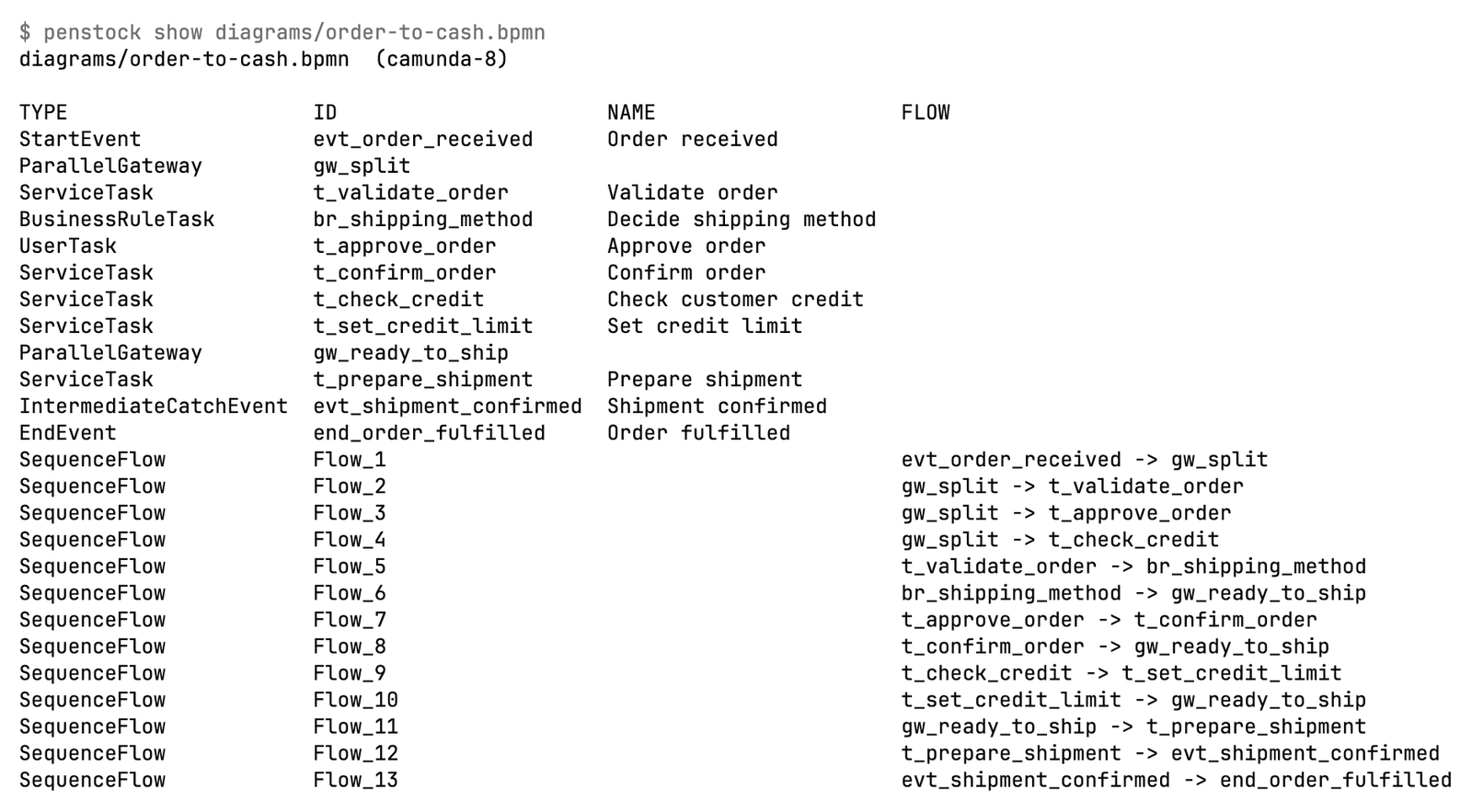
Needs: Free
| Exit code | Meaning |
|---|---|
0 | The diagram was read. |
1 | It is not a diagram, or not there, and the answer says which. |
2 | The CLI itself failed, not the command; the message says what. |
edit
Add, connect, set or remove in a diagram the way the editor would, and refuse an edit that would break it.
penstock edit <file> <add|connect|set|remove> ... [--ops <json>] [--ops-file <file|->] [--schema]penstock edit orders.bpmn add service-task --after Task_check --name "Reserve stock" --set jobType=reserve-stock
penstock edit orders.bpmn connect Gateway_stock Task_notify --condition "=not(inStock)"
penstock edit orders.bpmn set Task_notify --set assignee=support --input customer==order.customer
penstock edit orders.bpmn remove Task_legacyAdds, connects, sets or removes in a diagram the way the editor would. A new element is placed and connected by the editor's own modelling, gets an id from your conventions, and carries only properties your engine knows. After an edit the diagram is read back and checked. An edit that would break the drawing (shapes on top of each other, a flow through a shape, a flow torn from its element) is not written, and nothing is written when the operations cannot be read. A crossing is reported but allowed. --ops and --ops-file take the same changes as JSON, which is the contract: several operations apply together or not at all. --schema prints the contract for the file's engine, and an unknown operation, field or property is refused.
The operations are add, connect, set, remove and move. move is only in the JSON form: it shifts an element by dx and dy, in diagram units. A business rule task names its decision with decisionRef on Camunda 7, Operaton and CIB seven, and with decisionId on Camunda 8. These are the operations an AI agent proposes in the editor, where each is drawn on the canvas before it is accepted.
The file is read once, and the edit is made on that copy. If the diagram changed on disk while the edit was being made, because an editor saved it or another command wrote it, nothing is written over it. The command says The diagram changed while the edit was being made, so it was not written over. and exits with 1. Run it again on the new file. The result is written whole.
| Option | What it does |
|---|---|
--ops <json> | The operations as JSON on one line. |
--ops-file <file> | The operations as JSON in a file, or - to read them from standard input. |
--schema | Print the contract the operations follow, and change nothing. |
--after <id> | Add after this element, the way the editor places a new one. |
--event <type> | The event type to add. |
--name <text> | The name of the element that is added, connected or set. |
--id <id> | The id of the element to set or remove. |
--condition <text> | The condition of a sequence flow that is connected. |
--set <name=value> | An attribute to set, more than once. |
--input <name>=<value> | An input mapping, more than once. |
--output <name>=<value> | An output mapping, more than once. |
--dry-run | Say what would change and write nothing. |
--force | Write even when the edit would break the diagram. |
--profile <name> | Use this profile, as PENSTOCK_PROFILE would. |
Example
$ penstock edit src/orders/order.bpmn add service-task --after Task_check --name ShipNeeds: Pro, Team in a pipeline --schema is free.
| Exit code | Meaning |
|---|---|
0 | The diagram was changed, or --dry-run found nothing to change. |
1 | The edit would break the diagram, or could not be read, and nothing was written. |
2 | The CLI itself failed, not the command; the message says what. |
license status
Which licence this machine has, and why it is that one.
penstock license [status]Nobody copies a key: buying opens Polar's checkout and signing in is an e-mail code, and both end with the licence on this machine, in ~/.penstock/license.json, which the editors share. A key covers three machines. license alone is license status: which licence this machine has and why, and during the trial, when it ends. Without a licence it also says how to buy or sign in, and shows the education offer for Free Pro when one is set up. The other commands are below. In a pipeline set PENSTOCK_LICENSE to a Team key. It only counts when CI is set. See Pipelines, reports and the bot and Buying and signing in.
| Option | What it does |
|---|---|
--profile <name> | Use this profile, as PENSTOCK_PROFILE would. |
Example
$ penstock license statusNeeds: Free
| Exit code | Meaning |
|---|---|
0 | The answer was read. |
1 | The licence service could not be reached, and the machine stays as it was. |
2 | The CLI itself failed, not the command; the message says what. |
license buy
Buy Penstock. The checkout opens in a browser and the licence reaches this machine by itself once you have paid.
penstock license buy [pro|team]Opens the checkout in a browser and waits up to an hour for the payment, then asks for the e-mail code. It needs a terminal.
| Option | What it does |
|---|---|
--profile <name> | Use this profile, as PENSTOCK_PROFILE would. |
Example
$ penstock license buy proNeeds: Free
| Exit code | Meaning |
|---|---|
0 | The licence is on this machine. |
1 | The payment did not go through, or nothing was charged. |
2 | The CLI itself failed, not the command; the message says what. |
license login
Sign in with the e-mail you bought Penstock with. There is no key to copy.
penstock license login [email]Signs in with the e-mail you bought Penstock with. When every place is taken it lists the machines, so you can free one.
| Option | What it does |
|---|---|
--profile <name> | Use this profile, as PENSTOCK_PROFILE would. |
Example
$ penstock license login you@example.comNeeds: Free
| Exit code | Meaning |
|---|---|
0 | The licence is on this machine. |
1 | There is no licence bought with that address. |
2 | The CLI itself failed, not the command; the message says what. |
license activate
Use a key you already have.
penstock license activate <key>Activates a key you already have, typed by hand.
| Option | What it does |
|---|---|
--profile <name> | Use this profile, as PENSTOCK_PROFILE would. |
Example
$ penstock license activate PENSTOCK-PRO-...Needs: Free
| Exit code | Meaning |
|---|---|
0 | The licence is on this machine. |
1 | The key was not accepted, and the answer says why. |
2 | The CLI itself failed, not the command; the message says what. |
license key
The key for PENSTOCK_LICENSE in a pipeline, found again by the e-mail you bought with, because the machine no longer keeps it.
penstock license key [email]Prints the Team key for PENSTOCK_LICENSE in a pipeline, found again by the e-mail you bought with, because the machine no longer keeps the key. It needs a licence activated on this machine and a terminal, because it signs in with an e-mail code. Only a Team key is printed: keep it secret.
| Option | What it does |
|---|---|
--profile <name> | Use this profile, as PENSTOCK_PROFILE would. |
Example
$ penstock license key you@example.comNeeds: Free
| Exit code | Meaning |
|---|---|
0 | The key was found. |
1 | There is no Team key bought with that address, or there is no terminal to ask on. |
2 | The CLI itself failed, not the command; the message says what. |
license logout
Release this machine's licence so another machine can use it. The same as license deactivate.
penstock license logoutReleases this machine's licence so another machine can use it. license deactivate does the same.
| Option | What it does |
|---|---|
--profile <name> | Use this profile, as PENSTOCK_PROFILE would. |
Example
$ penstock license logoutNeeds: Free
| Exit code | Meaning |
|---|---|
0 | The licence was released, or there was no seat to release. |
1 | The licence service could not be reached. |
2 | The CLI itself failed, not the command; the message says what. |
trust
Let this project's penstock.yaml run shell commands here. A hook of check, layout or deploy asks for this first, and a project with no penstock.yaml is not trusted at all.
penstock trust [path] [--list] [--forget] [--yes]Lets a project's penstock.yaml run shell commands on this machine. A hook of check, layout or deploy asks for this first, and a project with no penstock.yaml is not trusted at all. In a terminal, penstock trust asks once for the project the path is in, which is the current folder by default, and records it in ~/.penstock/trusted-projects.json, keyed by its real path. The IDE plugin reads and writes the same file on IDEs before 2025.2, so a project trusted in one is trusted in both there.
--listprints every trusted project with the date.--forgettakes the project back.--yesdoes not ask. It is what a script wants. With no terminal the question is not asked either.
With no trust, a hook does not run. The message names the stage and the exact command that was refused, and says to run penstock trust, or to use --trust-project on check, layout or deploy to allow it for that one run. Inside a pipeline, where CI is set, hooks run without a question, because there the pipeline is the repository's own. A hook gets only four PENSTOCK_* variables: PENSTOCK_FILES, PENSTOCK_ROOT, PENSTOCK_STAGE and PENSTOCK_PROFILE. The licence key, the password and the tokens never reach it.
| Option | What it does |
|---|---|
--list | Print what is trusted on this machine. |
--forget | Take one project back. |
--yes | Do not ask, which is what a pipeline wants. |
--profile <name> | Use this profile, as PENSTOCK_PROFILE would. |
Example
$ penstock trust --list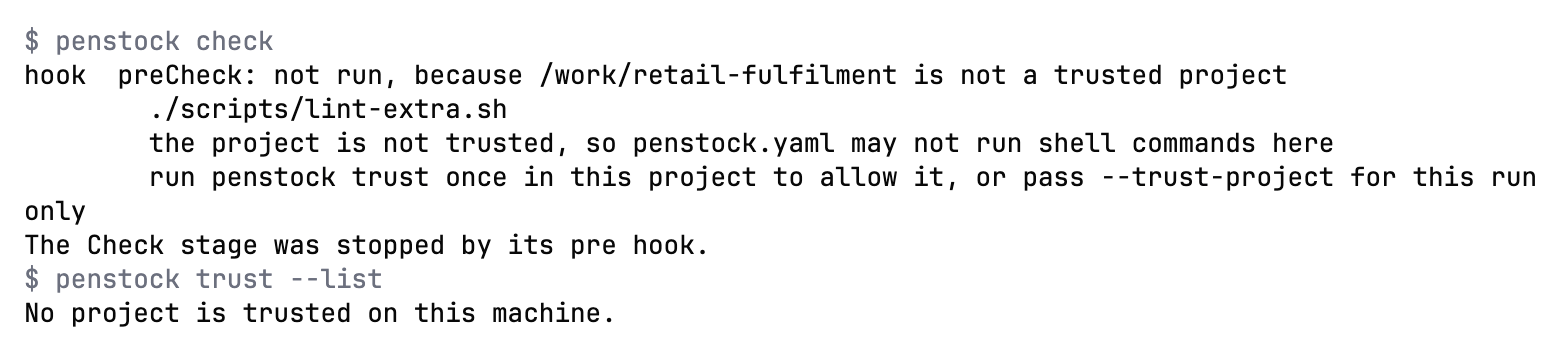
Needs: Free
| Exit code | Meaning |
|---|---|
0 | The project is trusted, forgotten, or the list was printed. |
1 | There is no penstock.yaml there to trust, or the path is not there. |
2 | The CLI itself failed, not the command; the message says what. |
mcp
Serve BPMN, DMN and form files to an AI agent over MCP. Reading, searching, comparing, checking, drawing as an image, the migration analysis, connections, AI agents, drift on one environment, importing, a single rename and the previews are free; flow analysis, scenarios, code links, layout, creating and editing, bulk refactoring, the evidence pack and the other writes need a licence.
penstock mcp [--project <dir>] [--config]Serves BPMN diagrams to an AI agent over MCP. --config prints the entry to paste into the agent's settings and stops. The entry goes to standard output and a hint goes to standard error. The entry names the exact version of the command line that printed it, as npx --yes @kern0x1b/penstock-cli@<version> mcp, so the agent runs that same version. A development build, which has no published version, prints penstock mcp instead. --project fixes the project every tool works on, so the agent does not have to name it, and nothing outside it is read. Without it the server finds each project from the files the agent asks about. To start an agent with the server already set up for one run, see agent. The server offers thirty tools. See The MCP server.
| Option | What it does |
|---|---|
--project <dir> | The project every tool works on, without the agent naming it; nothing outside it is read. |
--config | Print the client entry to paste into the agent, and stop. |
Example
$ penstock mcp --configNeeds: Free list_diagrams, show_diagram and check_diagram are free; the other tools are Pro, Team in a pipeline
| Exit code | Meaning |
|---|---|
0 | The server stopped, or the client entry was printed. |
1 | A tool was asked for something this machine does not have. |
2 | The CLI itself failed, not the command; the message says what. |
lsp
Run a language server for BPMN, DMN, CMMN and Camunda Form files, for editors that speak the Language Server Protocol.
penstock lsp [--stdio]A Language Server Protocol 3.17 server on the Check engine and the project model, so Zed, Helix, Neovim, Sublime Text, Emacs eglot, Kate and Eclipse LSP4E show the check findings where they are, with hover, go to definition, references, symbols, folding, quick fixes and completion, without a plugin. You do not run it by hand: the editor starts it. Stdio is the only transport; it makes no network call and executes nothing from the files it reads. The setup for each editor is on penstock lsp.
| Option | What it does |
|---|---|
--stdio | Speak over stdin and stdout, the only transport there is; the editor starts the command and this is what it passes. |
Example
$ penstock lsp --stdioNeeds: Free
| Exit code | Meaning |
|---|---|
0 | The editor shut the server down and asked it to exit. |
1 | The editor closed the connection first, or the command was started in a terminal or with a transport other than stdio. |
2 | The CLI itself failed, not the command; the message says what. |
connectors
List Camunda's connector templates, or where they are cached on this machine. Downloaded from GitHub at most once a day.
penstock connectors [--refresh]penstock connectors # list the current templates
penstock connectors resolve <id> [version] # print one template as JSON
penstock connectors --refresh # ask GitHub for a newer release nowLists Camunda's connector templates, or where they are cached on this machine. They are downloaded from GitHub at most once a day and cached in ~/.penstock/connectors/. See Element templates.
| Option | What it does |
|---|---|
--refresh | Check GitHub for a newer release now. |
--profile <name> | Use this profile, as PENSTOCK_PROFILE would. |
Example
$ penstock connectors --refreshNeeds: Free
| Exit code | Meaning |
|---|---|
0 | The list was printed. |
1 | The release list could not be downloaded, and the answer says when it will try again. |
2 | The CLI itself failed, not the command; the message says what. |
connectors resolve
Print one connector template, resolved to the version asked for or to the newest one in the cache.
penstock connectors resolve <id> [version]Prints one connector template, resolved to the version asked for or to the newest one in the cache.
| Option | What it does |
|---|---|
--refresh | Check GitHub for a newer release first. |
--profile <name> | Use this profile, as PENSTOCK_PROFILE would. |
Example
$ penstock connectors resolve http-jsonNeeds: Free
| Exit code | Meaning |
|---|---|
0 | The template was printed. |
1 | There is no template with that id, and the answer says what there is. |
2 | The CLI itself failed, not the command; the message says what. |
update
Move the project's wrapper to a version, the latest by default.
penstock update [version] [--distribution <spec>]Moves the project's wrapper to a version, the latest by default. It downloads the version into ~/.penstock/wrapper/dists, replaces penstockw and penstockw.cmd with the scripts that version ships, and writes the version into penstock/wrapper/penstock-wrapper.properties. Commit those files. It needs a wrapper in the project: run penstock init first. --distribution says where to get Penstock from, a tarball or a registry spec, and is kept in the properties file. penstock wrapper was the old name and still works. See The wrapper.
| Option | What it does |
|---|---|
--distribution <spec> | Where to get Penstock from: a tarball or a registry spec. |
--profile <name> | Use this profile, as PENSTOCK_PROFILE would. |
Example
$ penstock update 26.10.0Needs: Free
| Exit code | Meaning |
|---|---|
0 | The wrapper was moved. |
1 | It could not be, and the answer says which step refused. |
2 | The CLI itself failed, not the command; the message says what. |
web
Serve the editor in a browser, on this machine only. With a folder it opens that project; without one it starts on a welcome page where you choose the project in the browser. A key in the link keeps other pages and other users out, and nothing is sent anywhere.
penstock web [folder] [--port <port>] [--host <address>] [--no-open]Starts a server for the BPMN, DMN and form editors, the project tree and the tabs of Penstock Web. It listens on 127.0.0.1 and prints a link that carries a key that is new on every run. It opens a browser on that link, and stops on Ctrl and C. The recent projects are kept in ~/.penstock/preferences.json. The safety rules, the preferences it keeps and the language servers are on penstock web.
| Option | What it does |
|---|---|
--port <port> | The port to listen on, 8765 by default; the next free one is used when it is busy. |
--host <address> | The address to listen on, 127.0.0.1 by default; any other makes the folder reachable from the network. |
--no-open | Print the link and do not open a browser. |
--profile <name> | Use this profile, as PENSTOCK_PROFILE would. |
Example
$ penstock web ./processes --port 9000Needs: Free What needs Pro in an IDE needs it here too.
| Exit code | Meaning |
|---|---|
0 | The server was stopped with Ctrl-C. |
1 | The folder is not there, the port or address is not usable, or no port was free. |
2 | The CLI itself failed, not the command; the message says what. |
agent
Start an AI agent's own command line in this terminal with the penstock MCP server already set up for this one run. Nothing is written to the agent's own configuration or to the project.
penstock agent [claude|codex|gemini|opencode|<id>] [--project <dir>] [-- <arguments>]Without a name it lists the agents and which of them are installed. With a name it starts that agent's own command in this terminal, in the current folder or the one --project names, and gives it the penstock mcp server through the agent's own command-line settings or environment, for this run only. What follows -- goes to the agent as it is. The exit code is the agent's own. An agent you added in the settings of the AI chat is started with its own command and arguments, and gets the server as JSON in the environment variable PENSTOCK_MCP_CONFIG. The tools the agent gets keep their own licence: see The MCP server.
$ penstock agent
Agents that penstock agent <name> can start:
  claude    Claude Code: installed
  codex     Codex: installed
  gemini    Gemini CLI: not installed - npm install -g @google/gemini-cli
  opencode  OpenCode: not installed - npm install -g opencode-ai

Start one with: penstock agent <name> [-- <arguments for the agent>]| Option | What it does |
|---|---|
--project <dir> | The project the penstock tools work on, and the folder the agent starts in; the current project by default. |
--profile <name> | Use this profile, as PENSTOCK_PROFILE would. |
Example
$ penstock agent claude -- -p "list the diagrams"Needs: Free The tools the agent gets keep their own licence: see mcp.
| Exit code | Meaning |
|---|---|
0 | The agent ended normally, or the list was printed. |
1 | The agent is not installed or not known, or could not be started. Any other code is the agent's own. |
2 | The CLI itself failed, not the command; the message says what. |
agent serve
Serve the AI chat of one project to the IDEs and editors that show it: its chats, their history and the agent behind them, over HTTP on 127.0.0.1 and nothing else.
penstock agent serve --project <dir> [--detach]One server for a project serves every window and every tool that shows its chats, so a chat that is running in one window shows as busy in the others. The server prints one line of JSON with its port and a key, {"port":...,"token":"..."}. Every request must carry the key as a Bearer token. A second agent serve for a project that already has a server prints the line of the running one. The server leaves a few seconds after no window is attached to it and no turn is running. An IDE starts it itself, so you rarely run it by hand.
| Option | What it does |
|---|---|
--project <dir> | The project folder the chats belong to. |
--detach | Start the server in its own session, print its line once it answers, and return. An IDE starts it this way so that a signal to its terminal does not stop the server for every window. |
--profile <name> | Use this profile, as PENSTOCK_PROFILE would. |
Example
$ penstock agent serve --project ./processesNeeds: Free to start. Sending a message needs Pro on a developer machine, and Team in a pipeline.
| Exit code | Meaning |
|---|---|
0 | Stopped by a signal, or left a few seconds after no window was attached to it and no turn was running. |
1 | No project was given, the folder is not there, or the server could not listen. |
2 | The CLI itself failed, not the command; the message says what. |
What you see
- Most commands print one line for each file. A line starts with a word:
ok,fail,wrote,kept,same,change,skip,would sendorsent. A command that prints a table aligns it in a terminal, with its header. When the output is piped, the table is tab-separated, with no header. - Findings are indented under their file.
- The exit code says the outcome. See the exit codes above.
Common problems
- An option is ignored.
- Check that it belongs to that command. For example
--writeis forlayoutandfmt, and--waitfordeploy.penstock <command> --helplists what the command reads. - "Unknown command".
- Run
penstock help. The old names are still accepted and say what replaces them. - The command says a feature is part of Pro.
- Run
penstock licenseto see the licence. In a pipeline the feature needs Team. See Buying and signing in. - A hook does not run and the message names
penstock trust. - The project is not trusted. Run
penstock trustin it, or pass--trust-projectfor one run. - The engine refuses a run as not a test engine.
- Set
deployment.forTests: trueon the profile, or run against an engine on this machine and confirm it once. - "This folder is too large to be a project; give the folder of the diagrams".
- The command was pointed at a filesystem root or at your home folder, and neither holds a
penstock.yamlor a.git, or at a folder with more than 100,000 entries. Give the folder of the project. Folders the command cannot read are passed over. - "The timeout should be a number of seconds."
- Give
--timeouttoscenarios runortest-casesa number above zero. - "order.bpmn is a folder, not a file."
- A folder carries the name of a diagram. Give the file, or the folder under another name.
- "... is a file, not a commit, branch or tag."
- The first argument of
diffis the base to compare against. To compare two files, give both as files:penstock diff <before> <after>. - The command says the project is not a Git repository.
diff <ref>andreportcompare against Git history. Run them inside a checkout.